

Sports club reports and official listsNumbers ready for the federation, the authorities and the board.
13 ready-made reports: from occupancy and athlete distribution to absence, collections and income-expense, from prospect conversion to retention. Official lists and the period activity report in one click; every report downloads as Excel, XML, YAML and JSON.
01REPORT LIST
Thirteen reports, one filter layout.
Reports narrow by season, centre, sport, category and group; a branch user sees only their centres. Coaches see absence, group occupancy, athlete distribution and licence / health reports.
Athlete Distribution
By sport, centre, category or group; gender, total and average age, with unique athlete counts.
Group Occupancy
Capacity, filled, free and rate; coaches see their own groups.
Absence
Present, absent, excused, late and attendance rate per athlete.
Collections
Monthly collections split into cash, credit card, transfer, cheque and promissory note.
Income – Expense
By type and direction; collected, income, expense and net — identical to the till.
Prospect Conversion
Referral, social media, website, walk-in, phone; enrolment and loss rates.
Message Usage
Monthly sent, failed, queued and credits used.
Licence and Health Tracking
Licences and medicals expired, expiring within 30 days or missing; missing documents.
Official Lists
Athlete, licensed athlete, coach and facility lists.
Period Activity Report
A PDF with athlete, training, competition-event and income-expense sections.
Coach Report
Groups, athletes, sessions given and missed, attendance rate, payroll paid.
Retention Rate
How many of a season’s athletes continue the next season.
Season Comparison
Athletes, groups, enrolments, planned and collected income, attendance, matches and wins.
02OFFICIAL LISTS AND ACTIVITY REPORT
An application file in minutes, not hours.
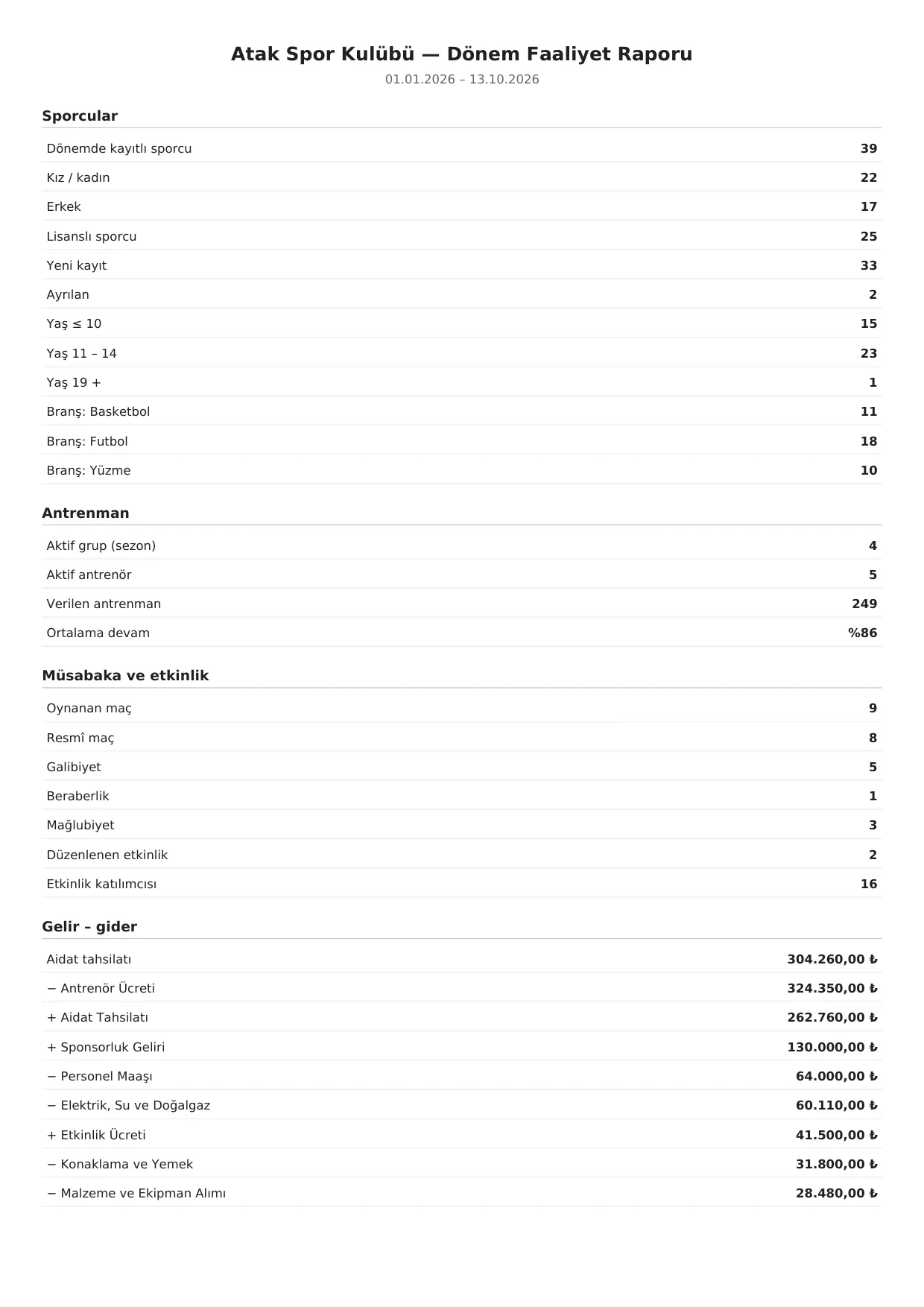
Official Lists prepares the athlete, licensed athlete, coach and facility lists requested in federation and provincial applications. The Period Activity Report produces a four-section PDF for grant applications or institutions.
- Athletes: enrolled, female and male, licensed, new and leaving; age bands and sports.
- Training: active groups, active coaches, sessions given and average attendance.
- Competition and events: matches and official matches, wins, draws, losses, events and participants.
- Income – expense: fee collections and in / out by type; the scope is printed on the PDF.

03OCCUPANCY AND DISTRIBUTION
Which group needs athletes, which age needs a new group?
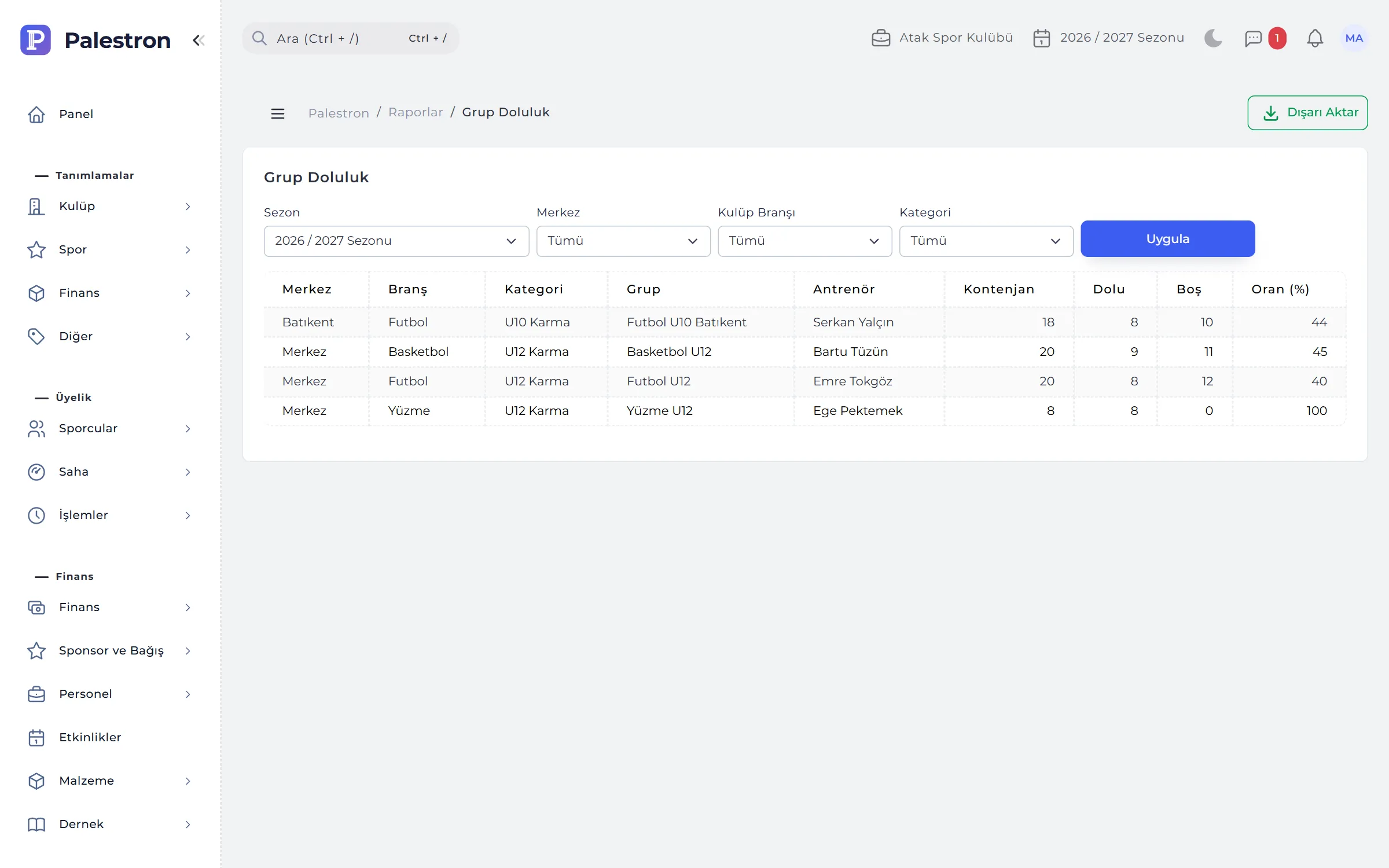
Group Occupancy gives each group’s capacity, filled and free places and rate. Athlete Distribution breaks down by sport, centre, category or group; an athlete enrolled in two sports counts once in the total.
- Decision support: open a new group next to those near 100%, merge groups with low occupancy.
- Season choice: ongoing enrolments in the current season, completed ones in past seasons.
04RETENTION AND SEASON COMPARISON
Are athletes staying, is the club growing?
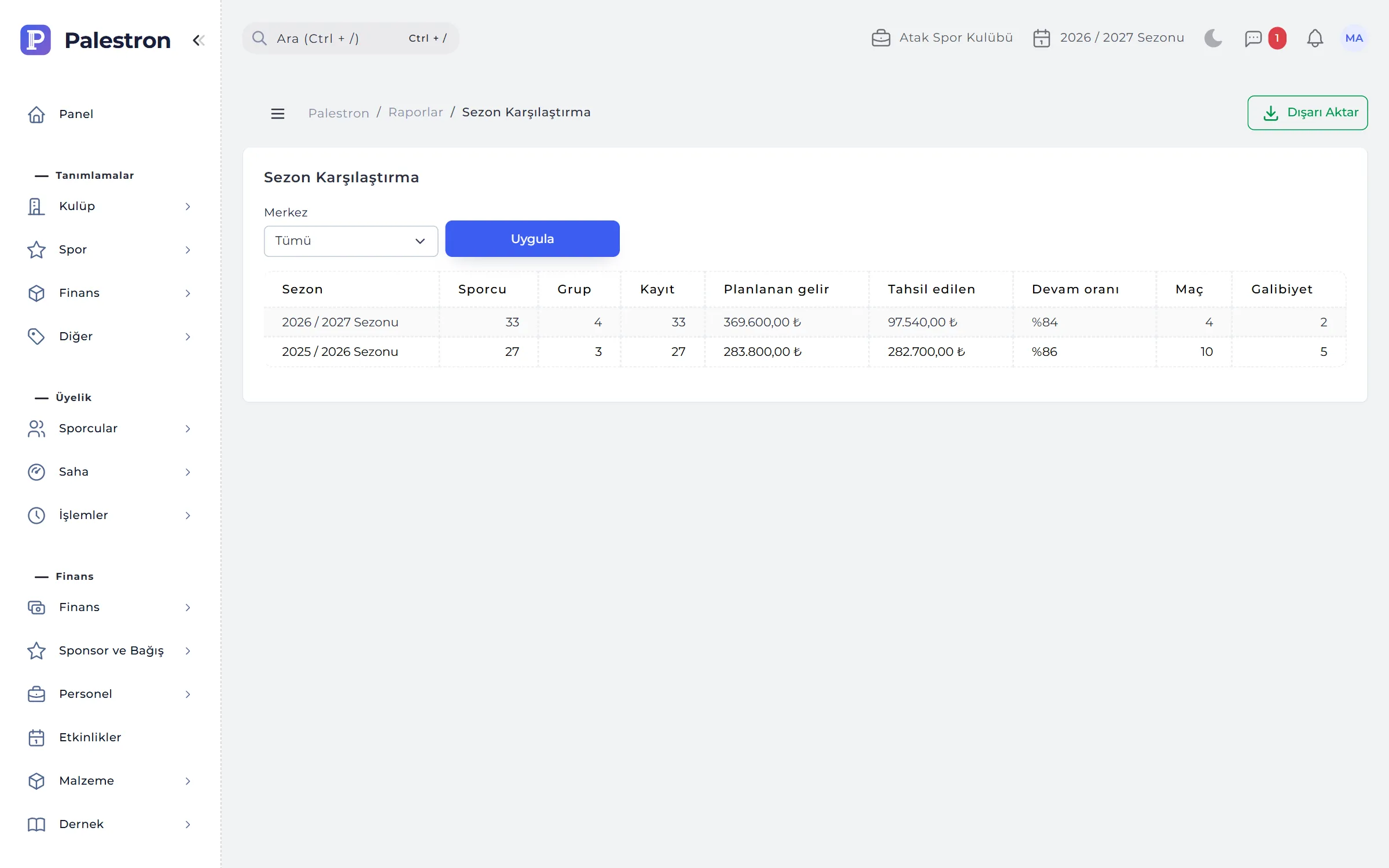
Retention Rate shows how many of each season’s athletes continue the next season, alongside new and leaving athletes. Season Comparison puts athletes, groups, enrolments, planned and collected income, attendance, matches and wins side by side.
- Collection success: the gap between planned and collected income shows how well the season was collected.
- Coach report: groups, athletes, sessions, attendance and payroll paid per coach.
05EXPORT, BACKUP AND AUDIT
Your data is yours, whenever you want it.
Every report and list downloads as Excel, XML, YAML or JSON; Excel output shows the report name, scope and time prepared. The backup screen gives all club records as one ZIP.
- ZIP contents: CSV that opens in Excel, machine-readable JSON and, if you choose, uploaded documents.
- Personal data consent: a safe-keeping confirmation is required before download; every download is audited.
- Kept out: passwords, two-step keys and provider credentials never go into backups.
RULES
Reporting rules
To read the reports correctly:
Income – expense = till
The report and Cash / Bank Status read the same movements; in, out and net match exactly for the same range (opening balances only in the till).
Scope printed
A branch user’s report and file state the scope, so an exported file is never mistaken for the whole club.
Unique counting
An athlete with several enrolments appears in several rows but counts once in the total.
By permission
Every report is a separate permission; users see only the reports they are allowed.
See it with your own club.
Leave a demo request and try Palestron with your own branches, sports and groups.