
Merge into one PDF
PDF, Word (.docx, .doc, .docm) and image (.jpg, .jpeg, .png) files are combined into a single PDF in the order you want.
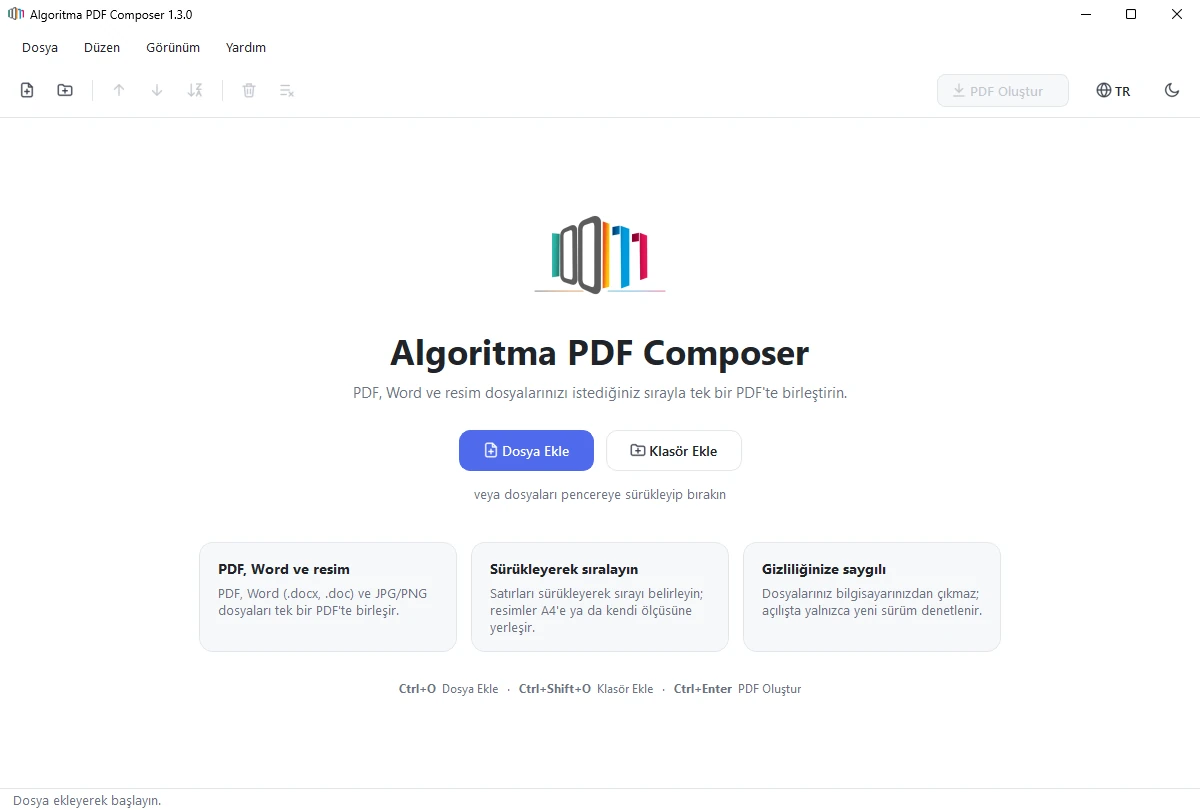
Algoritma PDF Composer is a free Windows app that merges your PDF, Word and JPG/PNG files into a single PDF in the order you choose. Drag the files onto the window, set the order; no installation, and your files never leave your computer.
WHY
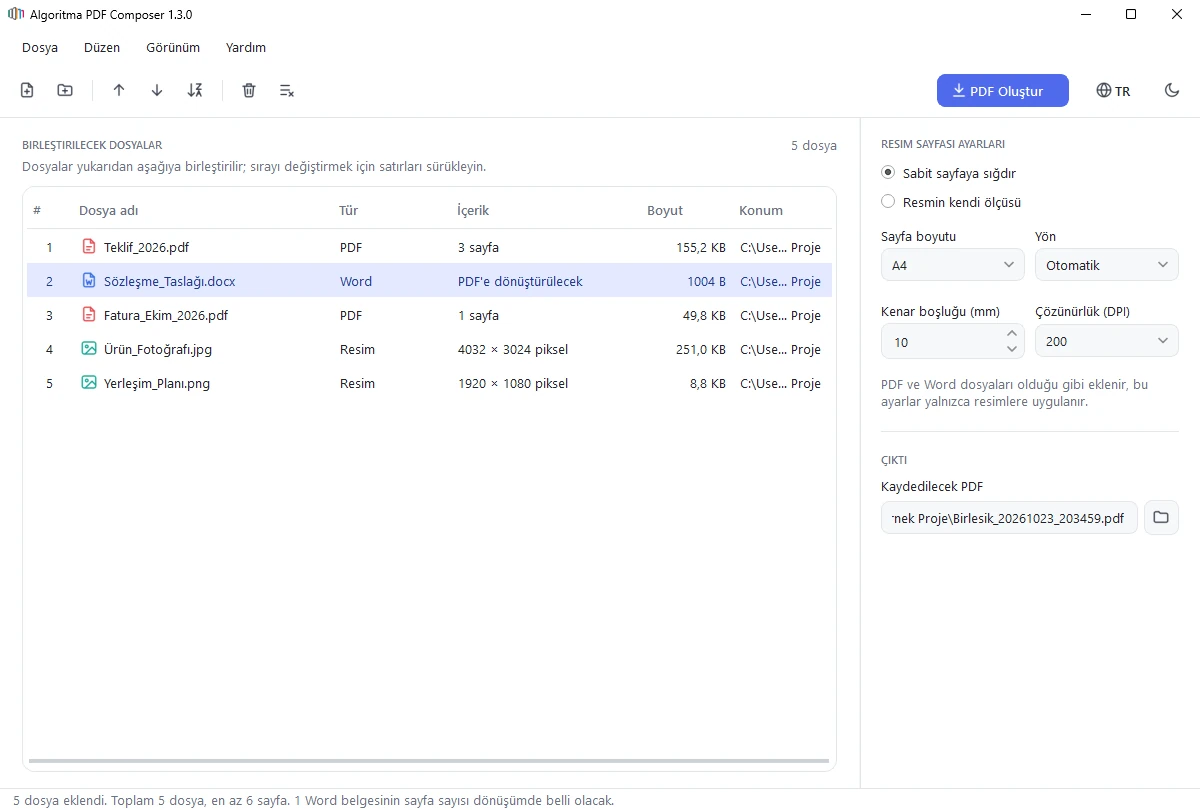
Sending a set of quotes, contracts, invoices and photos as a single PDF usually takes several programs and online tools. Algoritma PDF Composer does the job in one window, entirely on your computer: drag the files onto the window, set the order by dragging rows, press “Create PDF”.
Word documents are converted to PDF automatically while merging; layout, fonts and special characters are preserved. Photos and images are centred on A4 or the paper size you choose, or become a page of their own size. The modern interface with light and dark themes follows your Windows setting. The app needs no installation and never sends your files anywhere.
FEATURES
PDF, Word (.docx, .doc, .docm) and image (.jpg, .jpeg, .png) files are combined into a single PDF in the order you want.
Drag files and folders onto the window to add them; drag rows to change the order. Adding a folder brings in every suitable file in it, including subfolders.
Move files up or down, sort by name, remove from the list.
Word documents are converted with Microsoft Word or LibreOffice on your computer; formatting and special characters stay intact.
A3, A4, A5, Letter and Legal paper; portrait, landscape or automatic orientation; adjustable margin and resolution. An image can also become a page of its own size; phone photo orientation is corrected automatically.
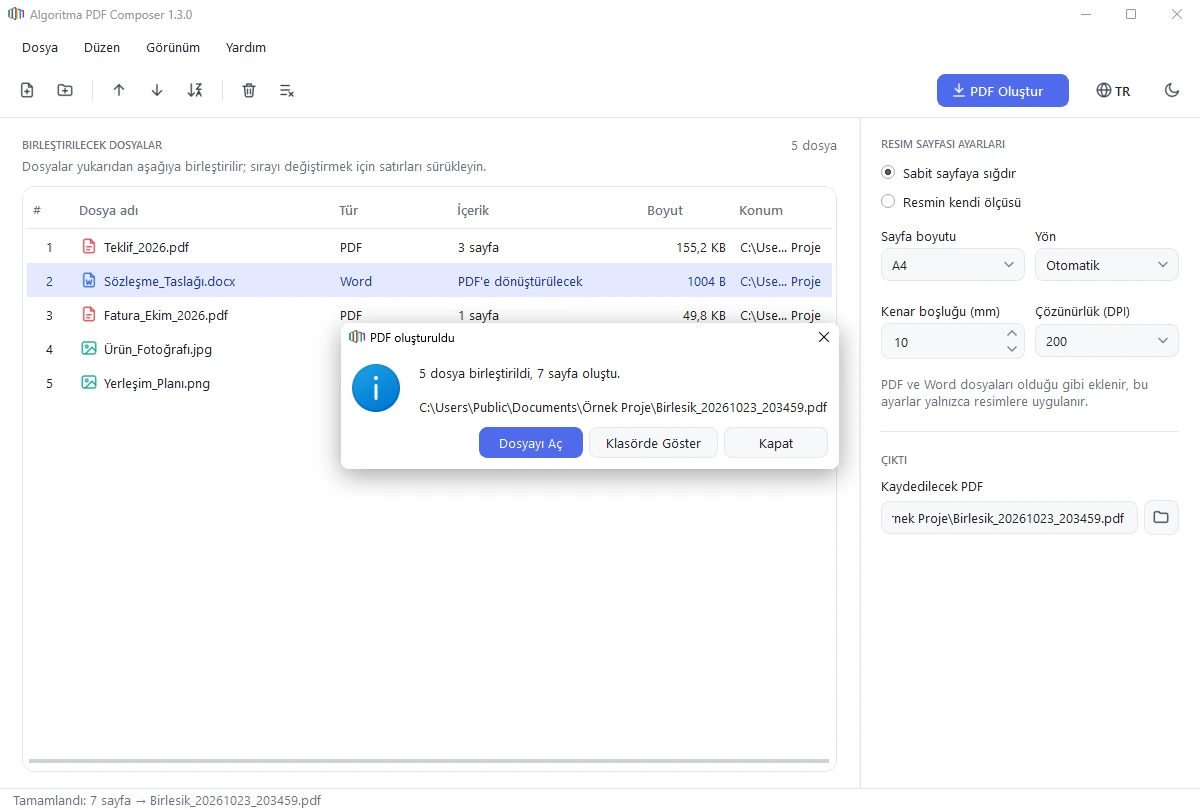
The list shows each file’s type, page count or pixel size, file size and location.
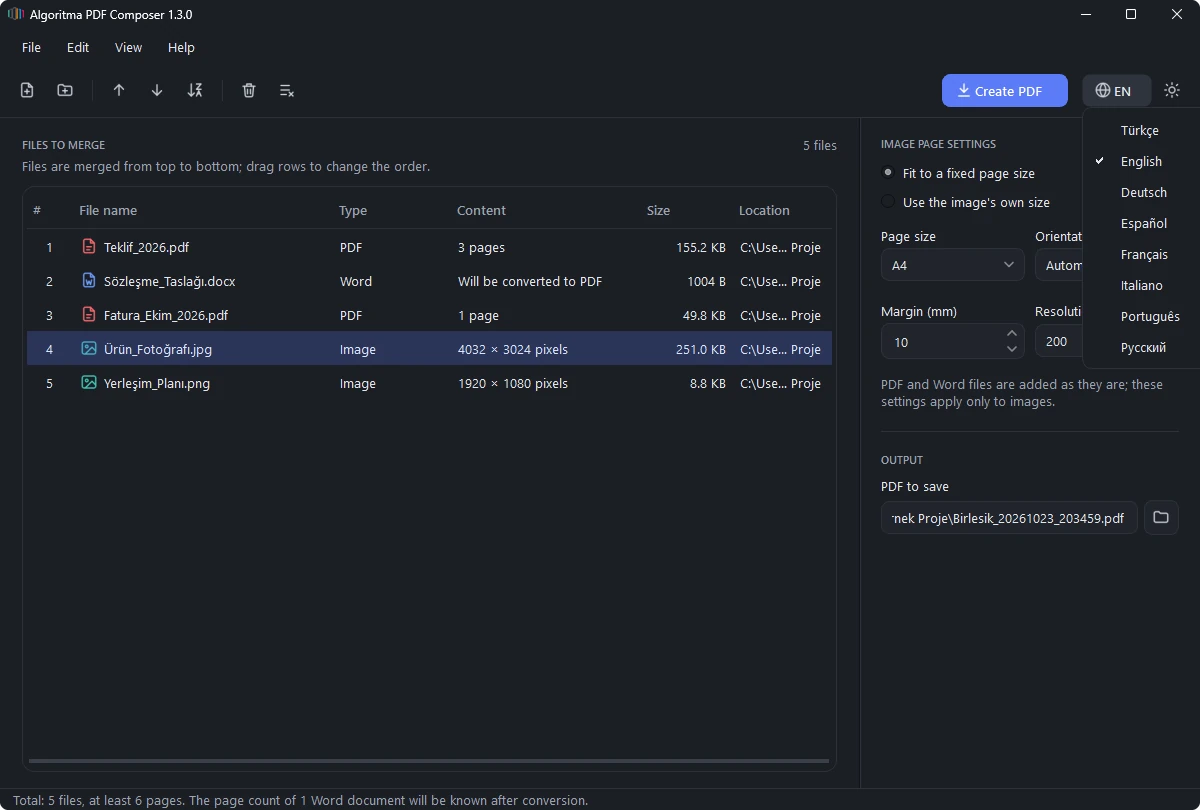
Turkish, English, German, Spanish, French, Italian, Portuguese and Russian. The app opens in your Windows language; switch instantly with the globe button on the right of the toolbar.
A modern interface that matches the Windows 11 look; the theme follows your Windows setting or changes with one click.
Unreadable or encrypted files don’t stop the job; they are skipped and reported at the end. Open the finished PDF or show it in its folder with one click from the dialog.
At startup the app checks whether a new version exists; if so, the toolbar shows “Update available” and opens the download page with one click. Nothing is downloaded automatically; with no internet, the check is silently skipped.
A single .exe file (or the folder edition if you prefer); just download and run. It also runs from a USB stick.
Advanced users can batch-merge without opening the interface.
HOW TO USE
| Type | Extensions | Note |
|---|---|---|
.pdf | Pages are added as they are | |
| Word | .docx, .doc, .docm | Requires Microsoft Word or LibreOffice |
| Image | .jpg, .jpeg, .png | Each image becomes one page |
SCREENSHOTS
PRIVACY
Everything happens on your computer; your files are never sent to any server.
At startup only the app id and version number are sent to algoritmayazilim.com; if a new version exists, the toolbar tells you. With no internet the check is skipped and the app works as usual.
No personal data or usage statistics are sent, and there are no licence or activation checks. Language, theme, window size and the last folder used are stored only on your computer.
The download page asks for no personal details; the download counter stores neither your acceptance nor your IP address.
Algoritma PDF Composer is free and provided “as is”. Algoritma Reklam İletişim Bilgisayar Eğitim San. ve Tic. Ltd. Şti. is not liable for any hardware, software or data problems that may occur on your computer, in your other software or in your files during or after using the software. We recommend backing up important files before use. You may not share the software with third parties; you may share the address of this page instead.
Algoritma PDF Composer is not digitally signed, so on first launch Windows may show “Windows protected your PC”. To open the app, choose More info → Run anyway. Your files are never sent anywhere.
SHA-256 (.exe): 06b0b751514e77c629dd5af2e2cee26defb15a2176a8e39105618b4af2f0a044
SHA-256 (.zip): c40a08295596d33e45974c771e3e1cad2af4e94f774369806362aef05332817f
Third-party licences
To check that your download is identical to the file we published, open PowerShell in the folder that contains it and run:
Get-FileHash .\Algoritma_PDF_Composer.exe
Get-FileHash .\Algoritma_PDF_Composer_1.3.0_klasor.zip
The Hash value must match the SHA-256 value on this page. If it differs, do not run the file; download it again from this page only.
Algoritma_PDF_Composer.exe (28.3 MB)Algoritma_PDF_Composer_1.3.0_klasor.zip (28.3 MB)06b0b751514e77c629dd5af2e2cee26defb15a2176a8e39105618b4af2f0a044c40a08295596d33e45974c771e3e1cad2af4e94f774369806362aef05332817fYes, Algoritma PDF Composer is free. You only need to accept the Terms of Use before downloading.
Please don’t share the file itself; share the address of this page instead. Anyone who wants to use the app should download it from this page after accepting the Terms of Use. If you downloaded it on behalf of an organisation, you may run it on the organisation’s computers for its employees.
No. The single-file edition (.exe) runs directly; the first launch may take a few seconds while the app prepares itself. For the folder edition, extract the zip to a folder and run the .exe inside.
They are the same application, and the single-file edition (.exe) is recommended for most users. In the folder edition the Qt and PySide6 libraries are separate files; it is provided, as the LGPL-3.0 requires, for anyone who wants to use the application with their own modified versions of these libraries. It also starts faster because it does not unpack files to the temporary folder. LGPL_OKUBENI.txt in the zip explains the details.
No. Merging happens entirely on your computer and your files are never sent to any server. If you are online, the app only checks at startup whether a new version exists (the app id and version number are sent); if one does, the toolbar shows “Update available” and opens the download page when clicked. Nothing is downloaded automatically; with no internet, the check is silently skipped.
Yes. PDFs and images are always merged. To convert Word documents as well, simply install the free LibreOffice.
Only PDFs with editing restrictions are merged. Files with an opening password are skipped and listed at the end of the job.
Yes. Because the app is not digitally signed, Windows SmartScreen shows the publisher as “Unknown publisher” and warns on first launch. The warning does not mean a problem was found. Click More info, then Run anyway. You can confirm the file is ours with the “Verify the file” steps.
Browsers show this for newly published files that have not been downloaded much yet. In Microsoft Edge, open the … menu next to the file in the downloads list and choose Keep, then Keep anyway if asked. Other browsers offer a similar Keep / Download anyway option.
Choose a language with the globe button on the right of the toolbar. Your choice is kept for the next launch.
For the single-file edition, delete Algoritma_PDF_Composer.exe; for the folder edition, delete the whole folder you extracted from the zip. Your preferences are kept in the %APPDATA%\Algoritma PDF Composer folder; you can delete that folder too if you like.
Microsoft, Windows and Word are trademarks of Microsoft Corporation in the United States and/or other countries. LibreOffice is a trademark of The Document Foundation. Algoritma PDF Composer is not affiliated with or endorsed by these organisations. The app contains open-source components; see the Third-Party Licences. The software is provided “as is” and its use is subject to the Terms of Use.