


No prospect gets lost
Every prospect — by phone, at the door or from the QR pre-registration form — is followed up to the date you set; once they decide, they become an athlete in one click, with their details and consents.

Palestron is sports club management software for clubs, schools and academies that brings prospects and pre-registration, athlete and parent records, groups and weekly schedules, attendance, match squads, fee instalments, collections, invoices, coach payroll and association records together. Athletes and parents follow schedules, fees, development reports and match calls in the mobile app; your club talks to them by SMS, WhatsApp and e-mail from one screen.
WHY PALESTRON
Attendance feeds coach payroll, collections feed the till, enrolments feed the fee plan; you always know where a number came from.
Every prospect — by phone, at the door or from the QR pre-registration form — is followed up to the date you set; once they decide, they become an athlete in one click, with their details and consents.
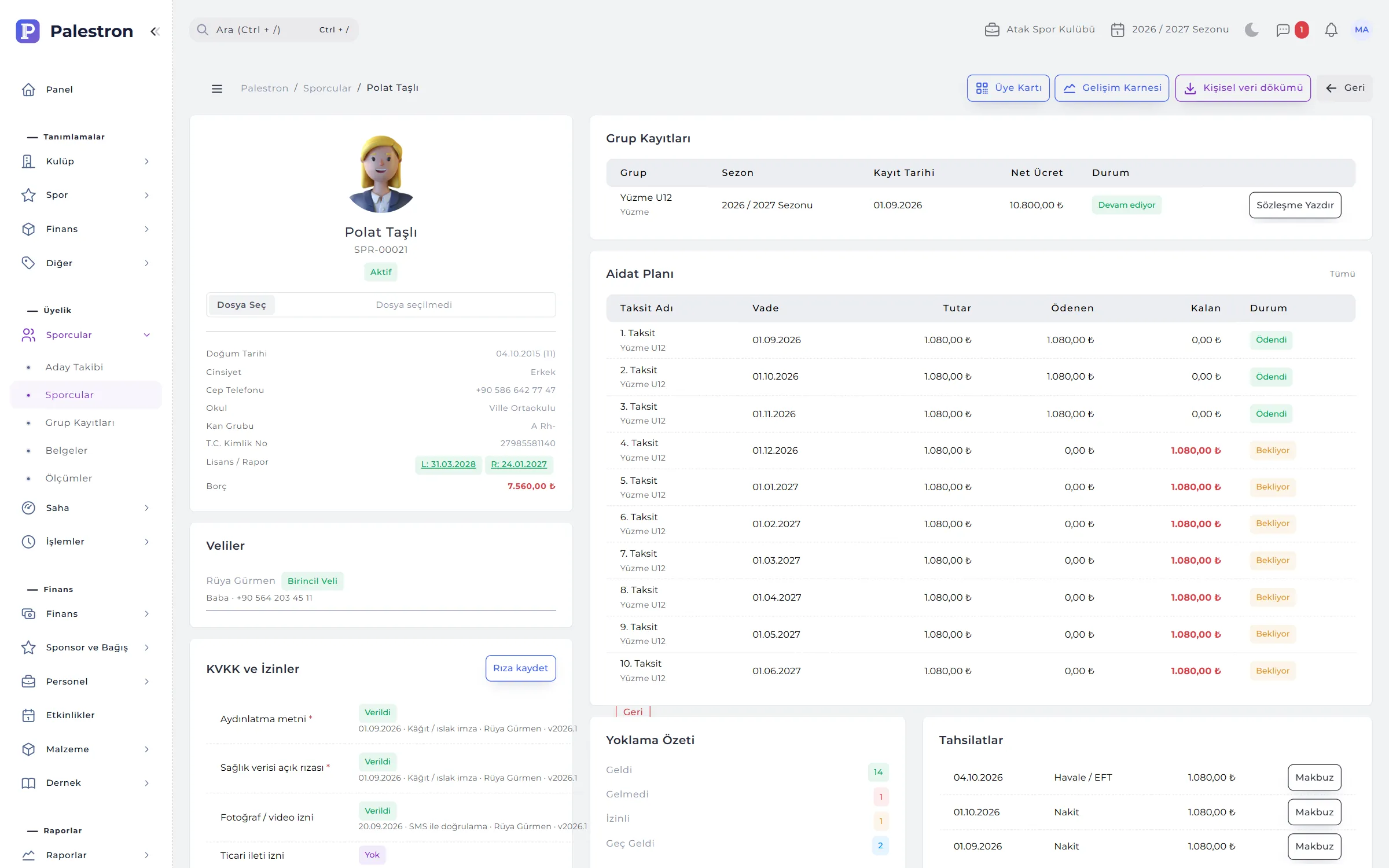
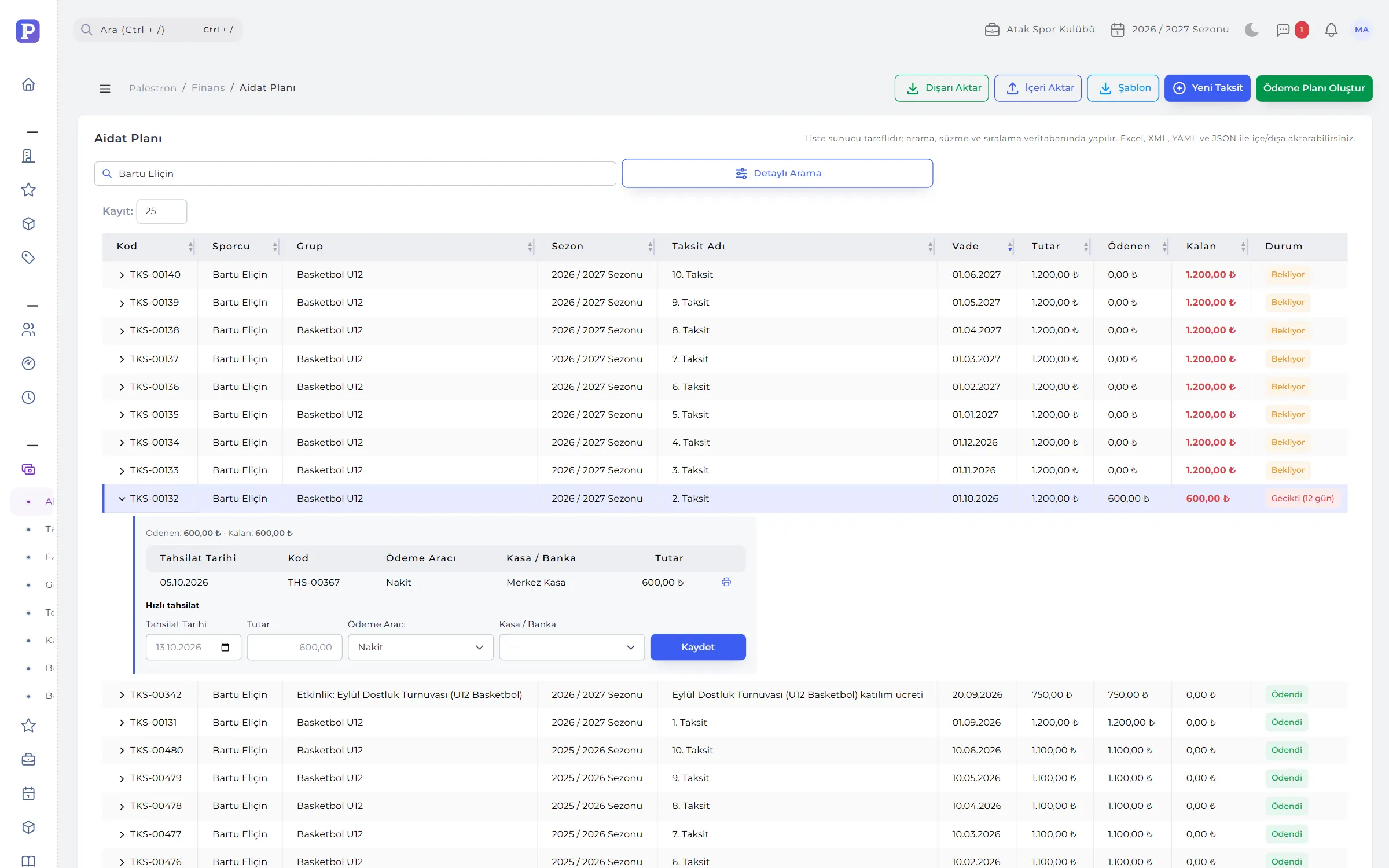
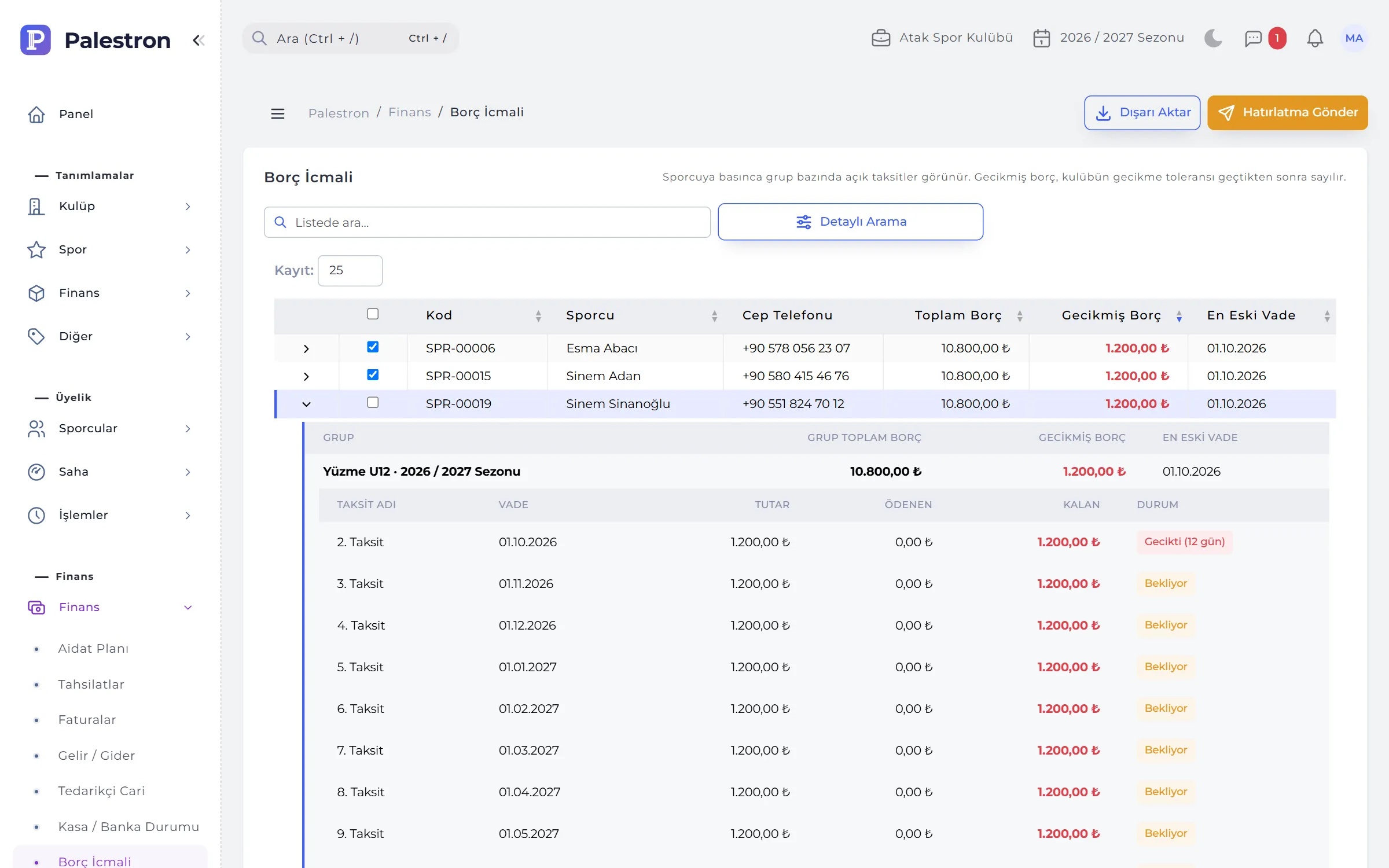
The instalment plan is generated from the enrolment. Parents get reminders for upcoming and overdue instalments; when they pay by card the collection is recorded automatically.
Every collection and expense goes to a cash or bank account. The income-expense report reads the same movements as the till; fees are never counted twice.
A coach sees only their groups, a branch manager only their branch, a parent only their child. Permissions are checked on every screen.
WHO IT’S FOR
The same structure from a single-sport school to a multi-sport, multi-branch club. Sports are picked from the system’s sports dictionary; football, basketball, volleyball, swimming, gymnastics, tennis and martial arts are run from one panel.
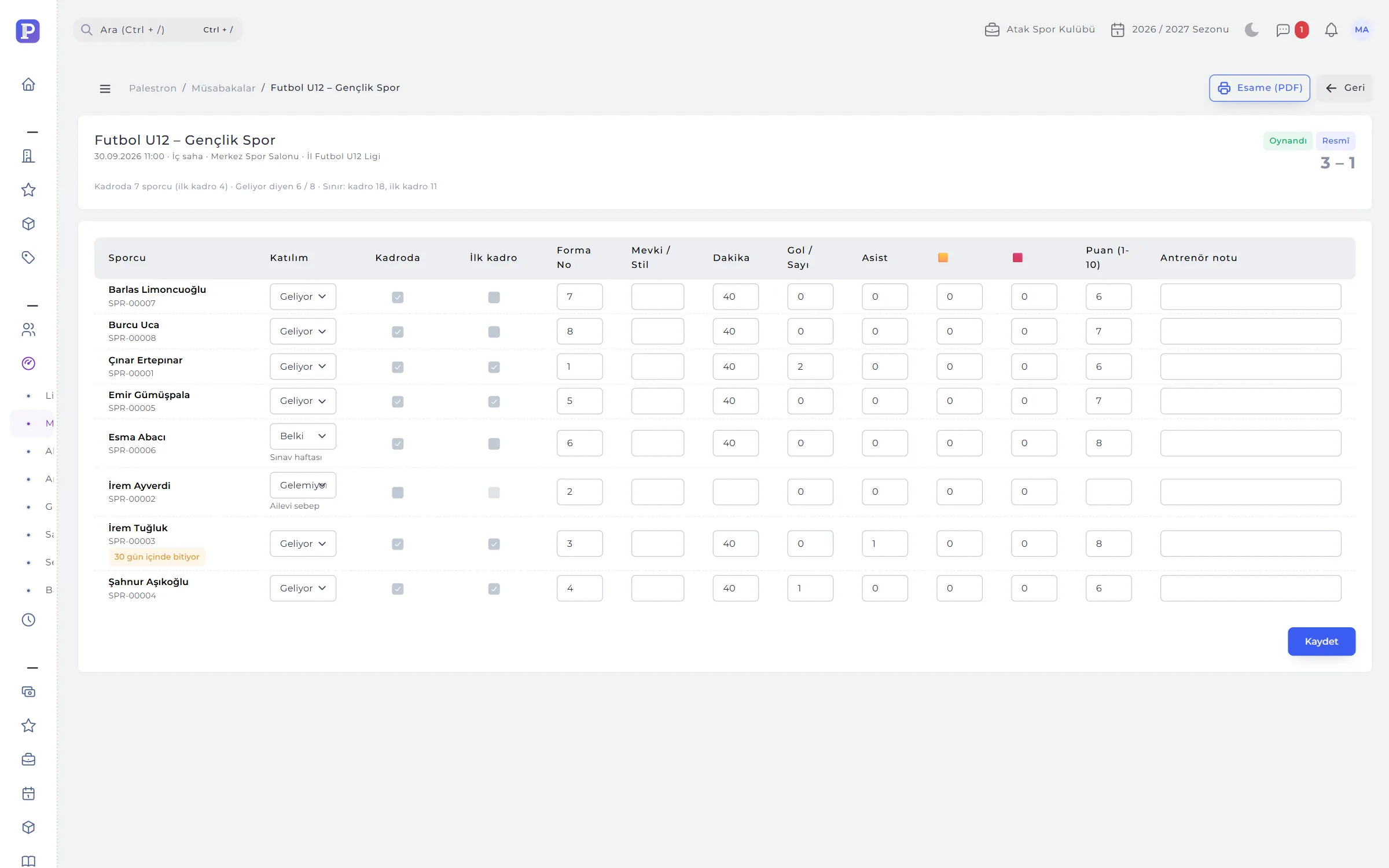
Training schedules and attendance by age group, match squads and parent call-ups; an athlete whose licence or medical certificate has expired cannot be named in a squad.
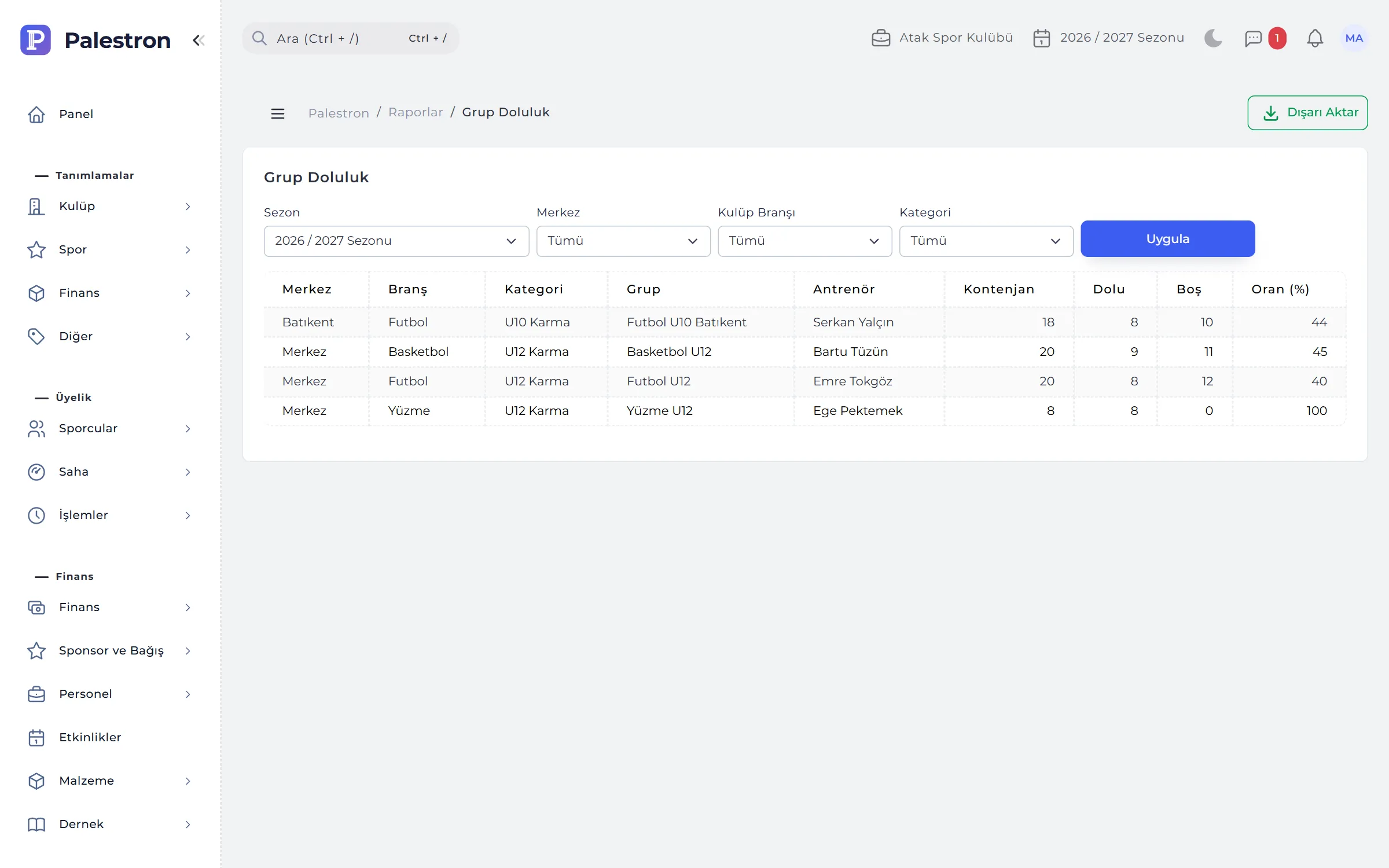
Coach clash checks, group occupancy tracking, facility rent and contract expiry alerts; fees and season enrolment on the same athlete record.
Level groups, enrolment and sibling discounts, level exams and development reports; parents follow schedules and fees in the app.
Belt exam tracking, athlete development reports, licence and medical certificate alerts for karate, taekwondo, judo and similar sports.
Member register, boards and resolution book, donation receipts, the period activity report; federation and provincial directorate lists ready.
A branch manager sees only their branch; club management compares occupancy, collections and coach reports for every branch on one panel.
MODULES
Every module writes to the same athlete record: attendance goes to coach payroll, collections to the till, match squads to the parent’s phone.
Prospects and online pre-registration, athlete and parent records, group enrolments and discounts, documents, licence and medical certificate, measurements, data-protection consents.
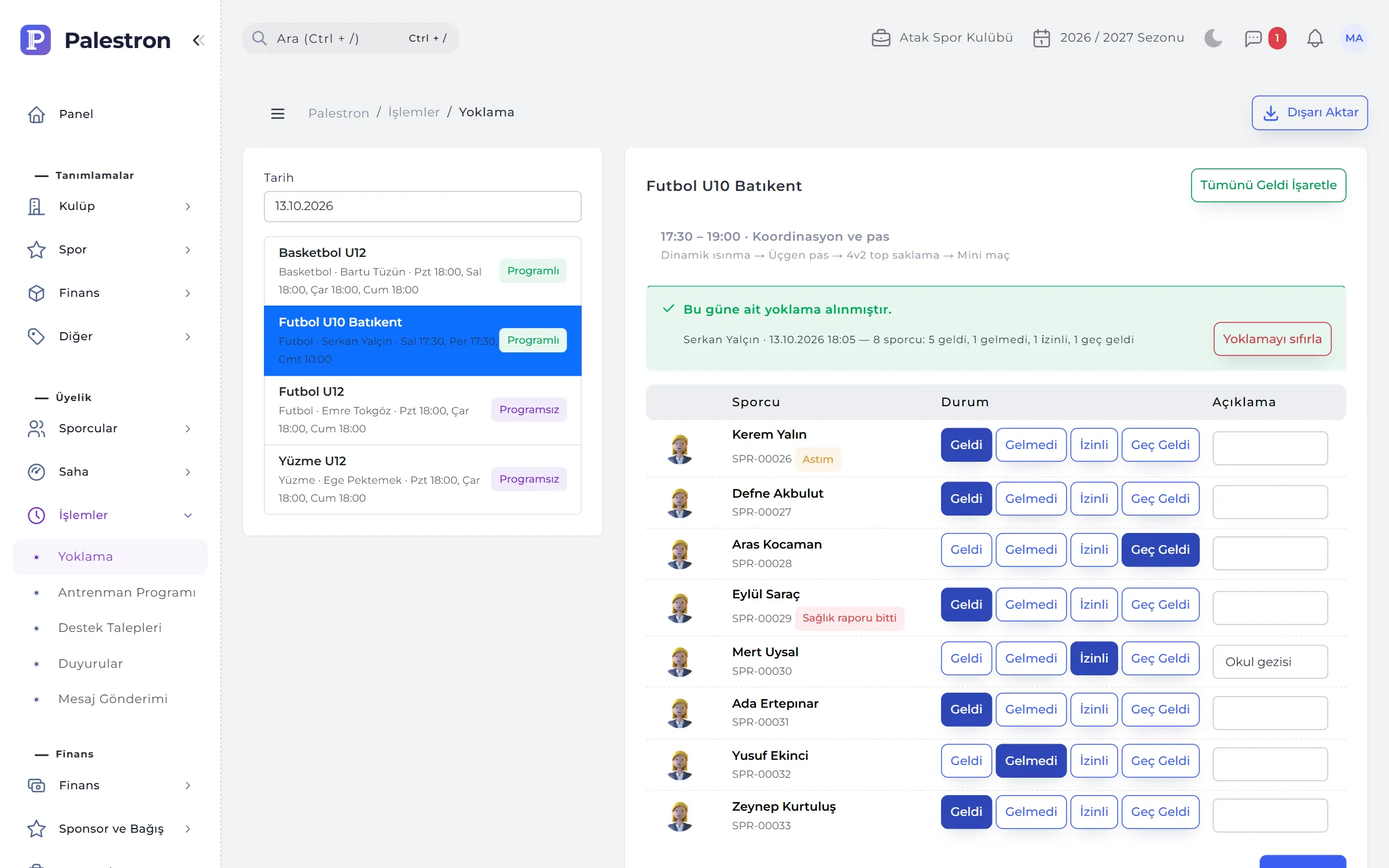
Groups and weekly schedules, attendance, drill bank and training plans, matches and squads, development reports, injuries, grading exams and achievements.
Instalment plans, collections, refunds and transfers, online payment, e-Archive / e-Invoice, income and expense, cash and bank, debt summary, supplier ledger, sponsorship and donations.
Branches, facilities and coaches; sessions, leave, advances and payroll; bulk messaging and support tickets; events, equipment and association records.
13 ready-made reports: occupancy, absence, collections, income-expense, prospect conversion, retention; federation and provincial lists, period activity report.
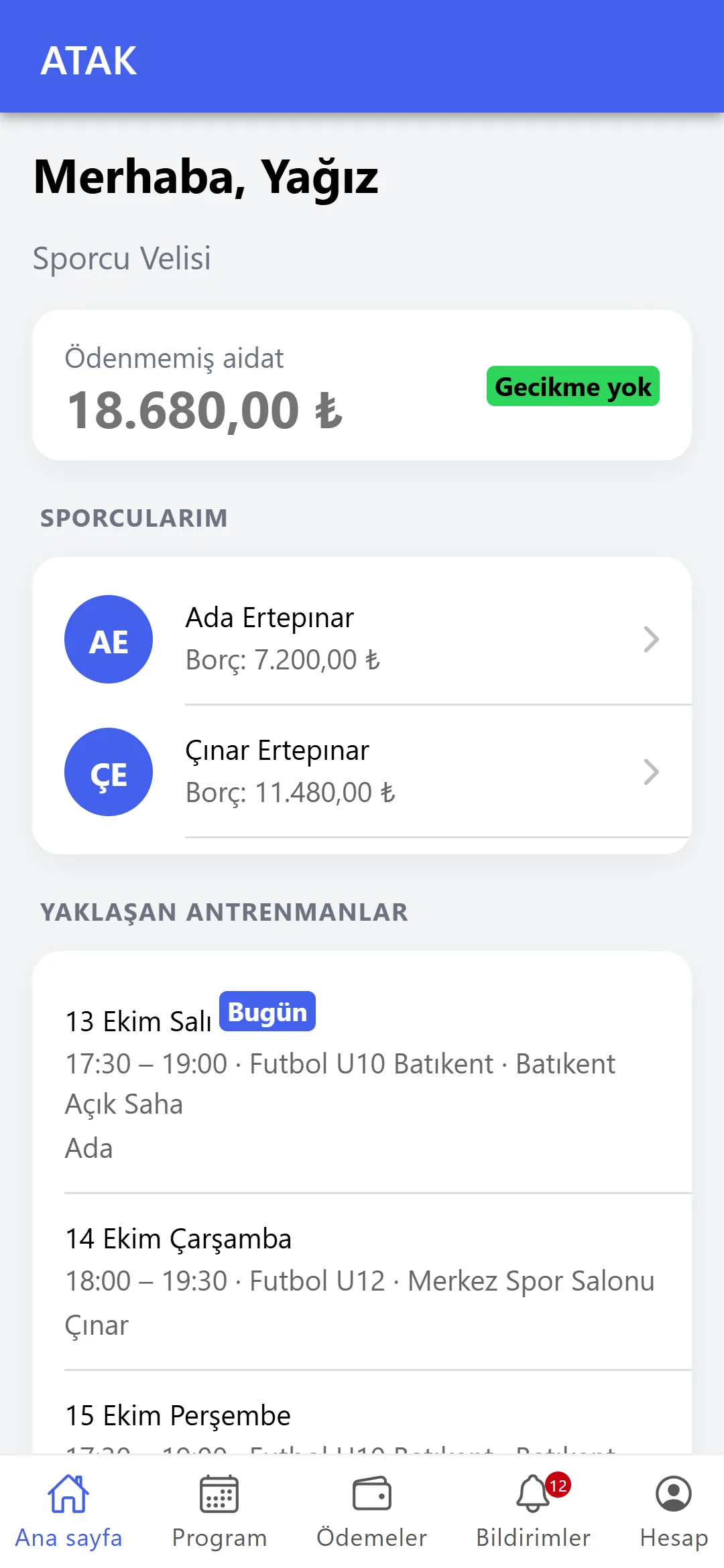
Schedule, fees and card payment, attendance history, development report, match replies, consents and support tickets; the showcase page and pre-registration form.
DASHBOARD
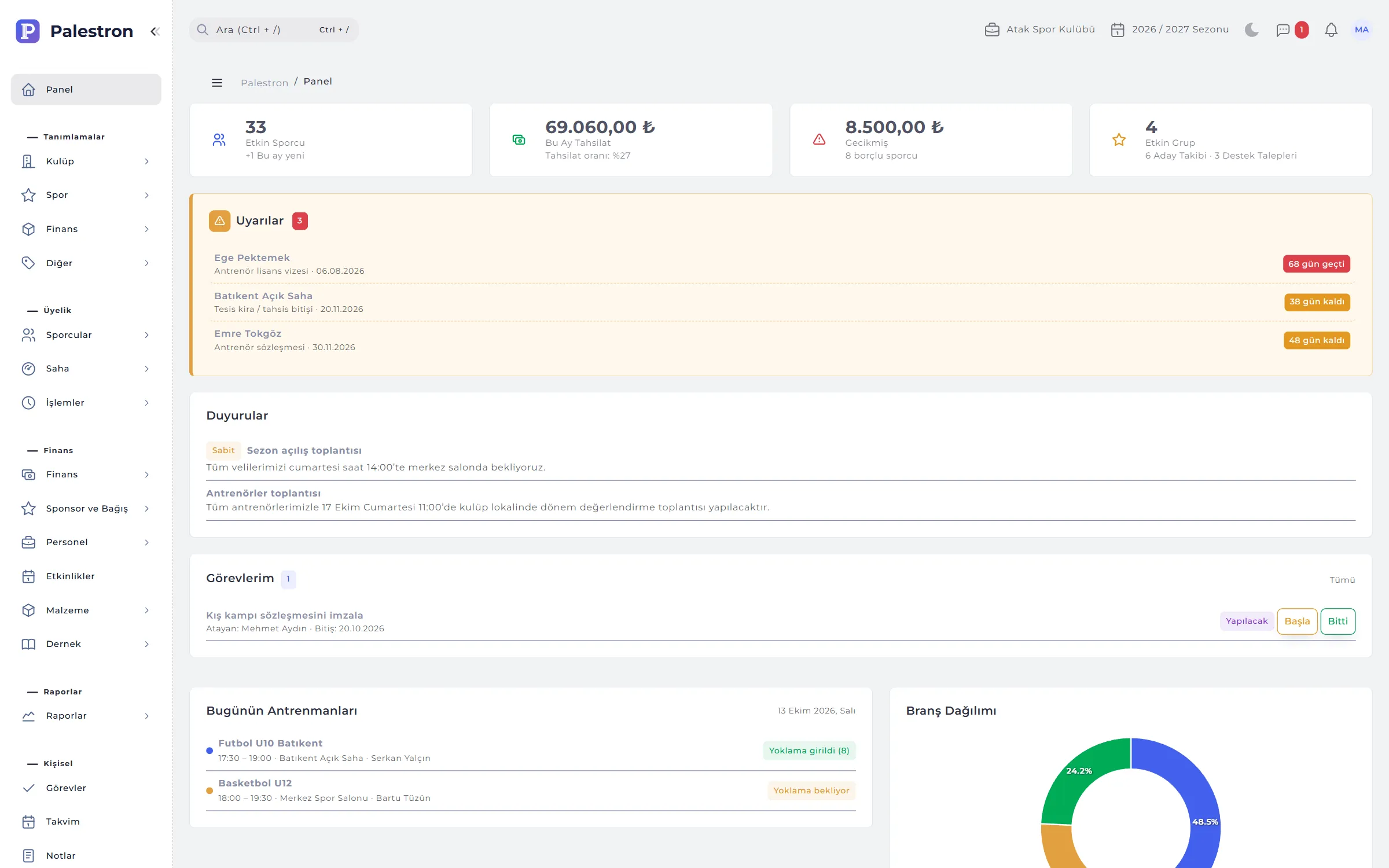
Every time you sign in the dashboard answers: How many athletes do I have, and how many owe fees? Which sessions are on today, and is attendance in? Is anything waiting for me? Tiles follow your permissions; for a branch manager they are calculated from that branch only.
COMMUNICATION
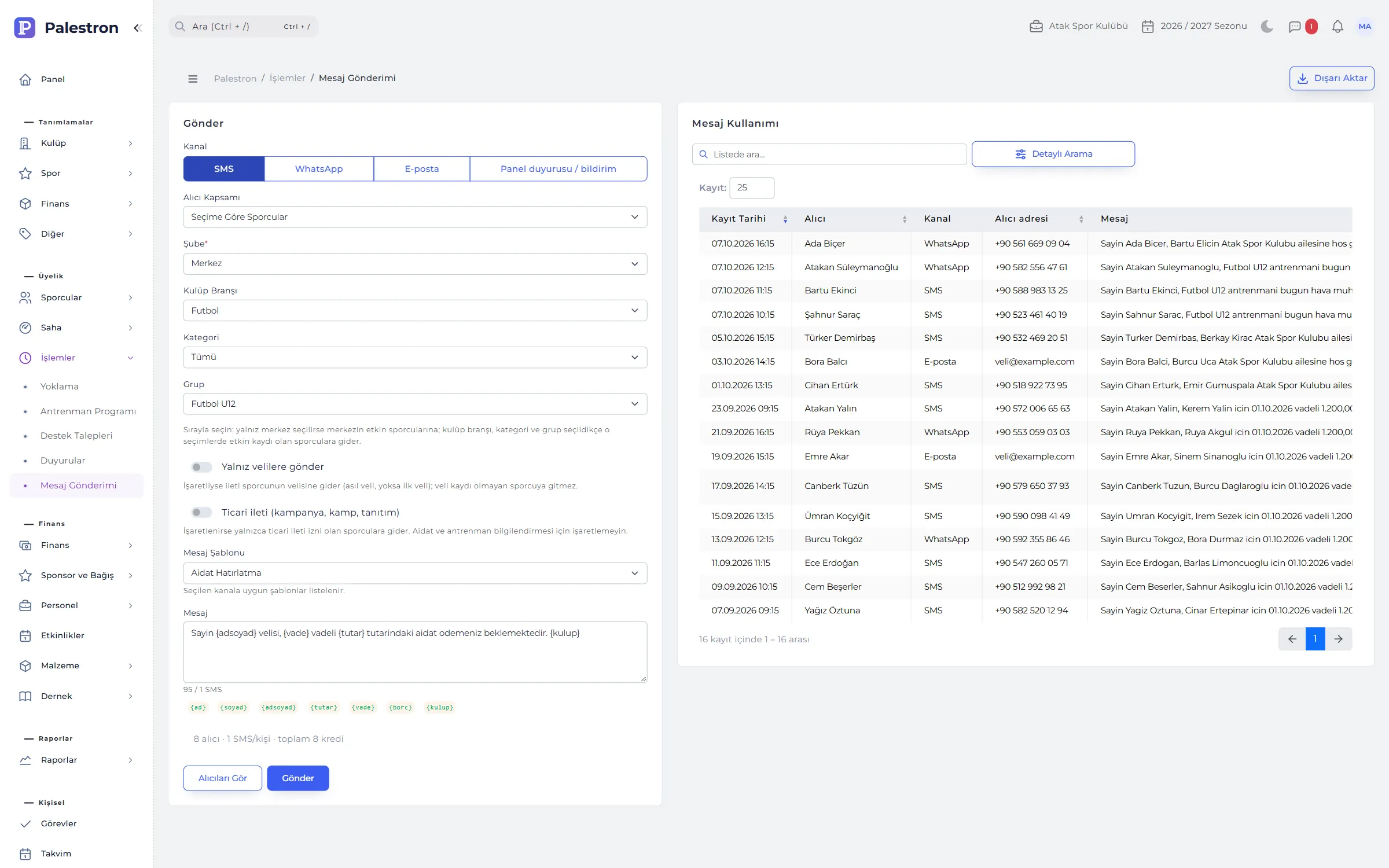
Messaging brings SMS, WhatsApp, e-mail and panel announcements together. You narrow recipients by branch, sport, category or group, and before sending you see how many people, how many SMS and how many credits it will take.
FROM PROSPECT TO ATHLETE
Palestron links every step from the first phone call to the end-of-season report; nothing is typed twice.
From the poster’s QR code or the club’s pre-registration address the form is filled in and consent given; the application lands in Prospects.
Every contact is logged; on the follow-up date the prospect appears on the dashboard and in the bell. The conversion report shows which channel brings enrolments.
Details and consents move to the athlete record. On enrolment the sibling discount applies automatically and the fee plan is built in one click.
Attendance opens the coach’s session and absences are notified; parents of athletes called up reply from their phone.
Due instalments are reminded, the parent pays by card; the collection reaches the till and the report at the same moment.
ROLES AND PERMISSIONS
A branch user sees only their branches on every screen; a coach only their groups, a parent only their child.
Everything: club details, opening branches, definitions, membership, field, finance, reports, users, permission templates, audit trail and backup.
Groups, facilities, athletes, enrolments, collections, operations and finance in their branches; club-level definitions are read-only.
Definitions, membership, field, operations and finance; cannot create users.
Finance, cash / bank, income-expense types and reports; does not touch membership records.
Attendance, measurements, training plans, evaluations, injuries and match records for their groups; no access to finance.
Reads definitions and reports; changes nothing.
In the mobile app: schedule, fees, attendance history, development report, match replies, consents and support tickets.
Siblings on one account: enrolment, fees and card payment, attendance, reports, match replies, consents and support tickets.
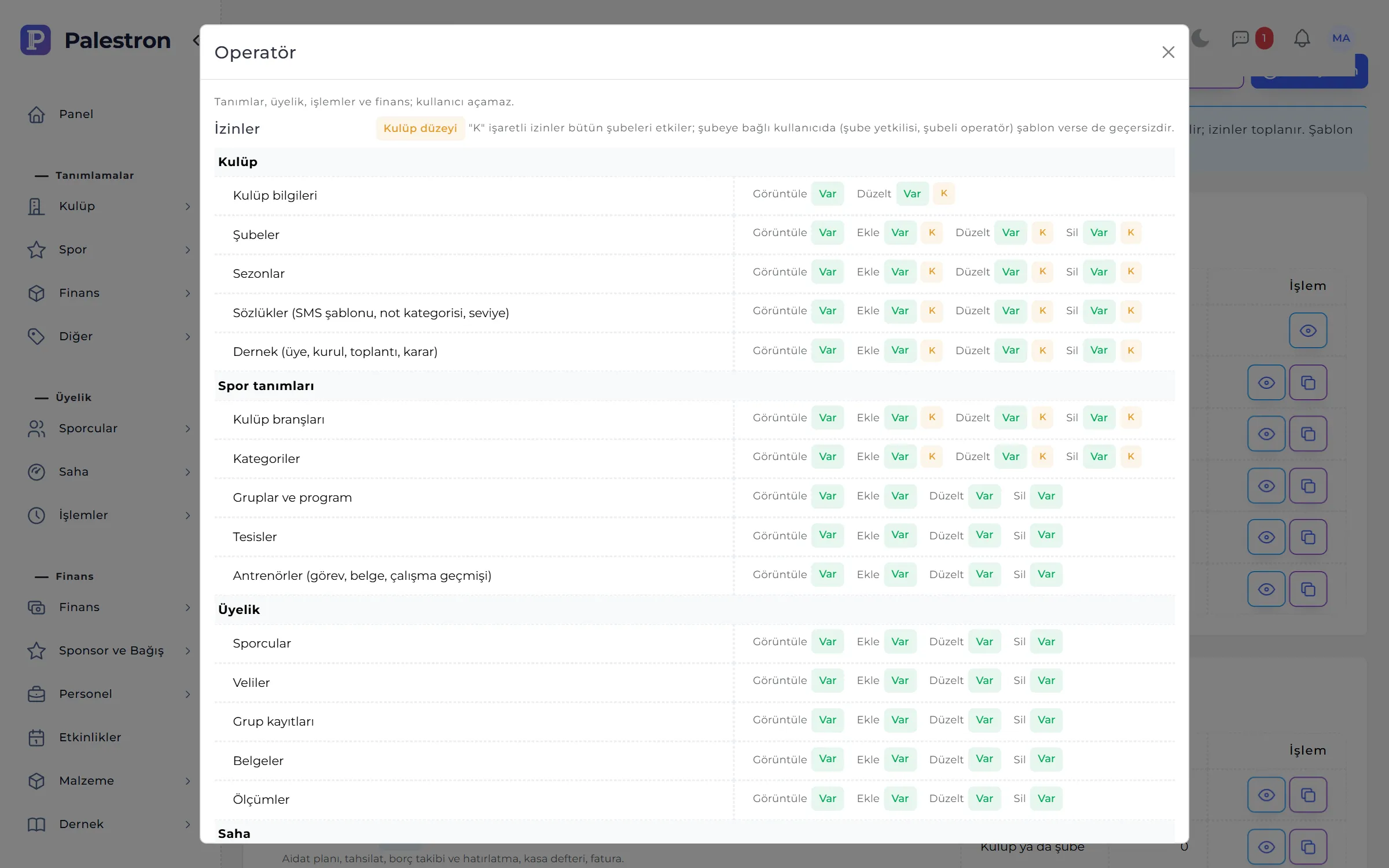
A template replaces the role’s permissions; with several templates the rights add up. Ready-made templates are copied and adapted to the club. The eye icon in the user list shows each person’s effective rights and where they come from.
SECURITY AND DATA PROTECTION
Sensitive data such as medical certificates, IDs and parent details open only with permission; every consent is kept with its version, every change with old and new values.
A 6-digit code from an authenticator app plus one-time recovery codes. Can be made mandatory for club administrators and accounting; asked in the mobile app too.
Privacy notice, health data, photo / video and marketing consent; collected on a signed form, by SMS code or by an in-person code, and kept with date and reason when withdrawn.
When a former athlete’s retention period ends you are alerted. Anonymisation deletes identity, contact, health and document data; fee records stay, anonymised.
Only users who can edit documents open a medical certificate; coaches and viewers see only whether it is valid.
Inserts, changes, deletions, sign-ins, voided collections, attendance resets and bulk SMS are logged with who and when; passwords are never logged.
All club data downloads as a single ZIP (CSV and JSON). After repeated wrong passwords the account locks for about 15 minutes.
EVERYDAY USE
Look at last season’s groups and reports in one click; data entry always stays in the current season.
Every list exports to Excel, XML, YAML or JSON with its filters; template imports report faulty rows by number.
Ctrl + / searches athletes, groups or prospects; Alt + N new record, Alt + S save.
The in-app guide covers only the screens the user can see; the Support Line goes straight to the software team.
SCREENS
Each module is covered in detail on its own page.
Amateur sports clubs, sports academies and sports companies. It works the same way for a small single-sport academy and for a club with several branches, facilities and sports; each branch sees its own data and club management sees them all.
Palestron doesn’t stop at fees and attendance. Coach payroll comes from attendance, the till and income-expense report from collections, the fee plan from the enrolment — automatically. Consents are kept with version and proof; the association’s member register, boards and resolution book, e-Archive invoices and official lists for federations sit in the same place.
No. Licence registration is done in the federation’s and ministry’s own systems. Palestron tracks licence numbers, visa and medical certificate expiry with their documents, warns before they lapse, keeps athletes with invalid licences out of official match squads and prepares the athlete, coach and facility lists requested by federations and provincial directorates.
Yes, if your club has an online payment provider set up. A payment link is created per instalment and can be sent by WhatsApp; when the parent pays by card, the amount is recorded as a collection in the chosen account automatically.
Your club’s SMS provider and a WhatsApp Business provider with approved templates. Details are entered in Club Details and checked with “Test connection”. Without a provider, e-mail and panel announcements still work.
Yes. Athletes, definitions and other lists import from Excel, XML, YAML or JSON templates; faulty rows are skipped and reported by number. User accounts and documents are created one by one for security.
Palestron keeps the club’s day-to-day bookkeeping: fees, collections, income and expense, cash and bank, supplier ledger, e-Archive and e-Invoice. Income-expense types can carry your accountant’s chart-of-accounts codes, and every list exports to Excel.
Sports are picked from the system’s sports dictionary; football, basketball, volleyball, swimming, gymnastics, tennis and martial arts with belt exams such as karate, taekwondo and judo are run in the same structure. Your club defines each sport it offers once and opens its groups under those sports; the dashboard shows a sports distribution chart.
In a spreadsheet the fee list, attendance and the till live in separate files; finding who owes what takes hours. In Palestron the instalment plan is set up at enrolment, an unpaid instalment drops into the debt summary, the parent gets an SMS or WhatsApp reminder and pays by card; the collection is posted to the till and the income-expense report automatically. You start by importing your existing athlete list.
The coach scores the athlete from 1 to 5 on technique, tactics, physical, mental and social / team, and writes strengths, areas to develop and a comment. The development report combines these evaluations with a height and weight chart, attendance rate and match stats as a PDF; parents see the report in the app.
Palestron is priced by quotation according to the size and needs of your club. Mention your number of athletes and branches in the demo request and the quote is prepared accordingly.
Just fill in the demo request form and a demo is opened for your club. You can also talk to our sales team with any questions.
Leave a demo request and try Palestron with your own branches, sports and groups.

