

Membership fee tracking, collections and club financeFees are planned, reminded, collected — and show in the till.
Membership fee tracking and club accounting together: instalment plans, collections, refunds and transfers, online payment, e-Archive and e-Invoice, income and expense, cash and bank, debt summary, supplier ledger, sponsorship and donations. Every penny goes to an account; the report and the till say the same number.
01FEE PLAN
The instalment plan comes from the enrolment and always totals the net fee.
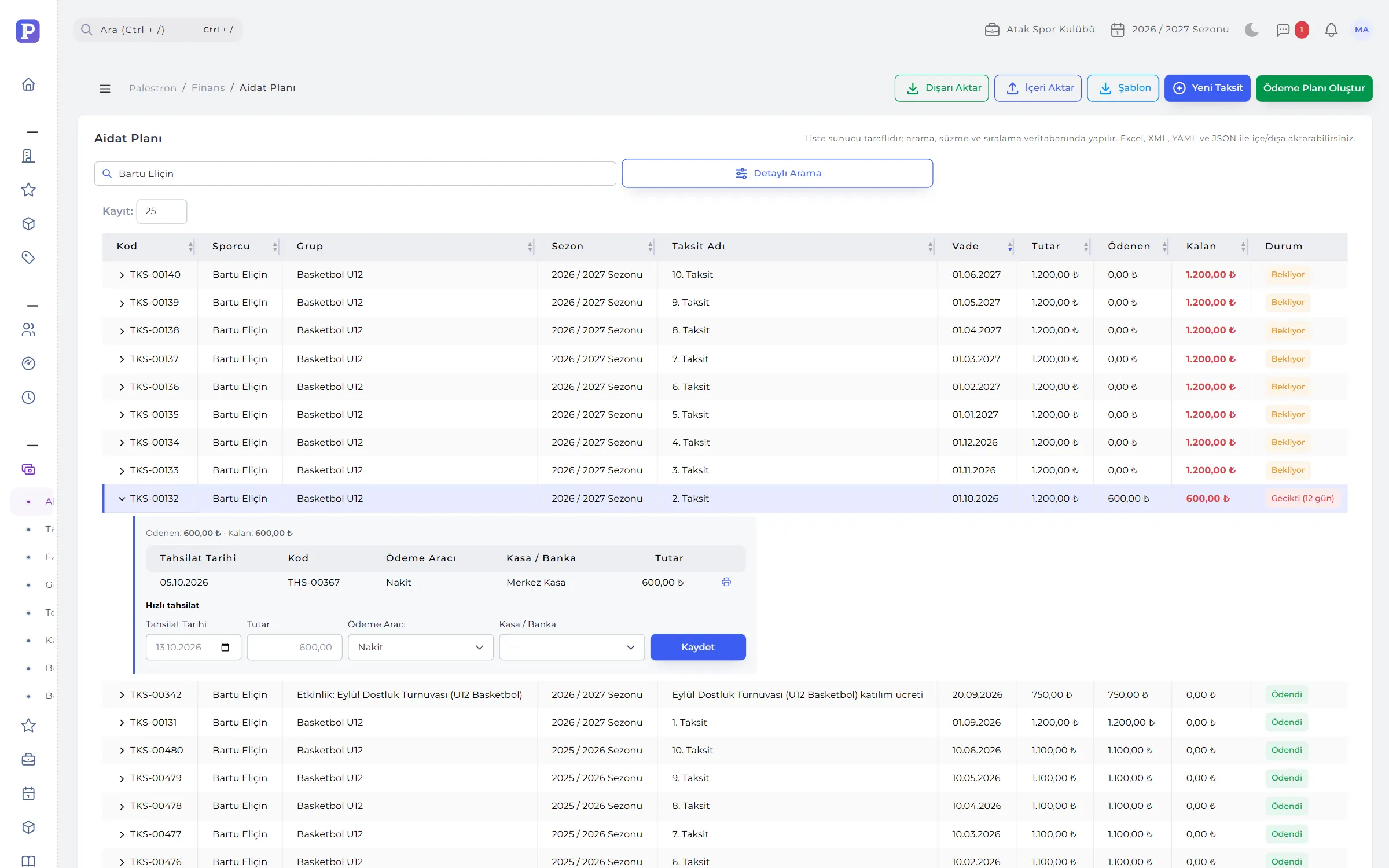
Create Payment Plan asks for the number of instalments, down payment, first due date and interval, and suggests how many instalments fit the group’s term. The preview always totals the enrolment’s net fee; any rounding goes to the last instalment.
- Detailed plan: edit each instalment’s name, due date and amount; if the total doesn’t match it says “Short” or “Over” and won’t save.
- Rebuilding a plan: instalments with collections are left alone; the plan is rebuilt for the remaining amount.
- Quick collection: right under the instalment row, with the balance and the club’s only account pre-filled.
- Late fee: added once to an instalment unpaid after due date and tolerance; parents get daily reminders for upcoming and overdue instalments.
02COLLECTIONS
Collections are never deleted — they are refunded, transferred or voided with a reason.
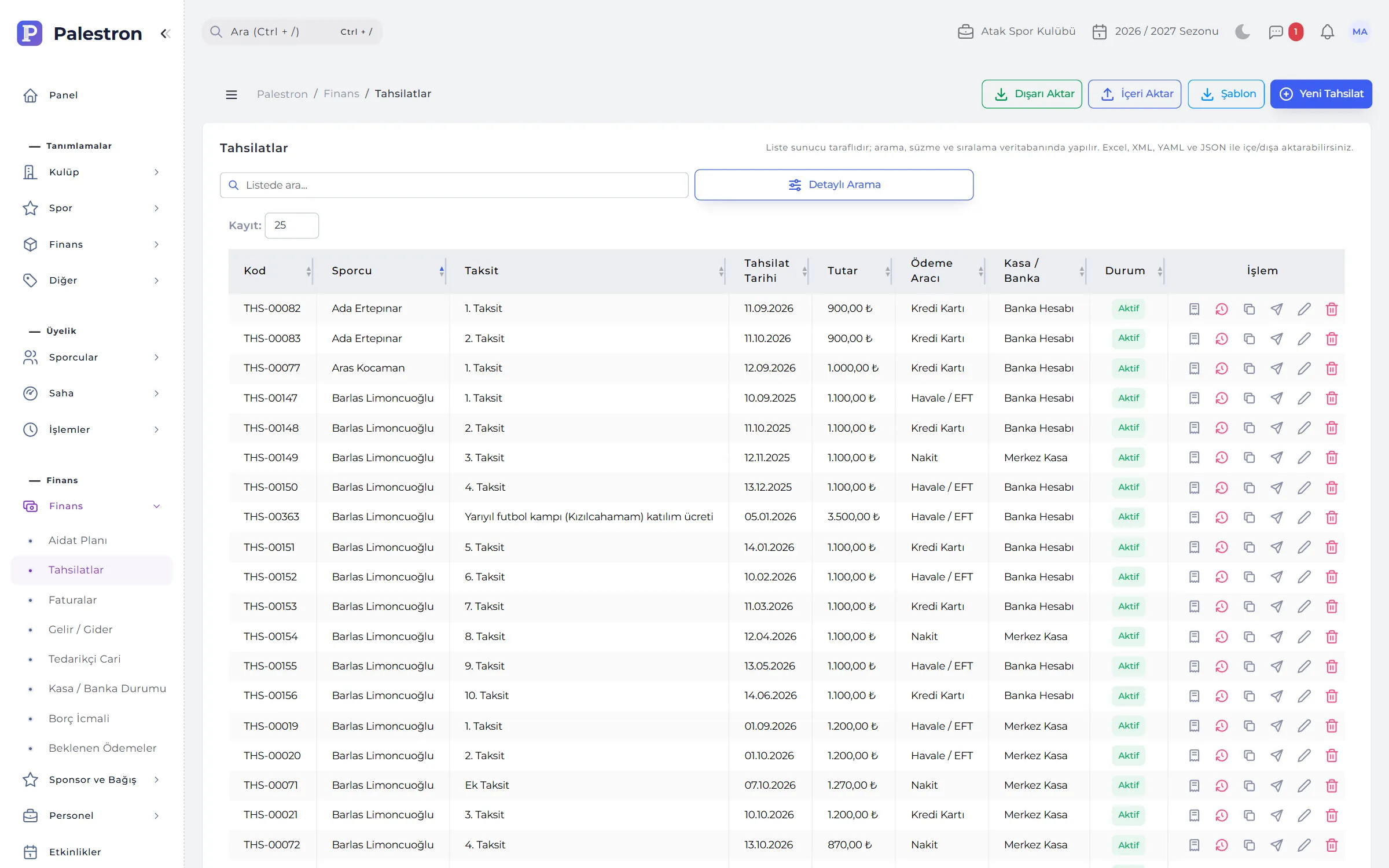
A collection is recorded with athlete, date, amount, payment method (cash, credit card, transfer, cheque, promissory note) and cash / bank account. Without an instalment, the amount is spread from the oldest open instalment onwards.
- Refund: when part or all of the money is returned; it leaves the account and the instalment reopens.
- Transfer: an amount posted to the wrong instalment moves to another of the same athlete; the till is untouched.
- Void: with a reason of at least 5 characters; the receipt stays stamped “VOID” and its number is never reused.
- Receipt and invoice: a printable receipt; “Issue invoice” drafts an invoice in the parent’s name.

03DEBT SUMMARY AND ONLINE PAYMENT
Debtors get a reminder, parents pay by card.
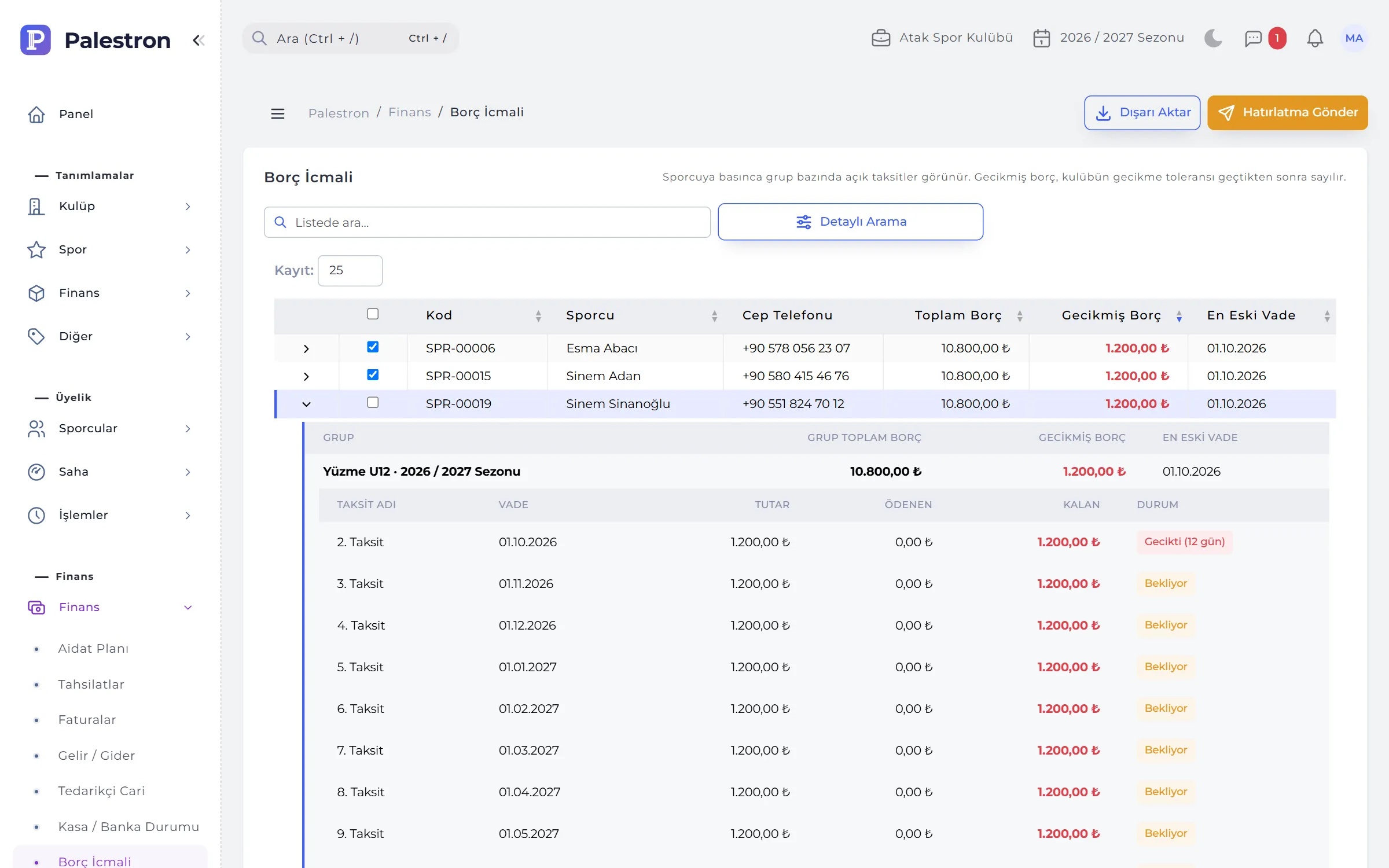
Debt Summary lists athletes with debt by total and overdue amount and oldest due date; tap an athlete to see open instalments group by group. Overdue counts from your club’s tolerance days. Expected Payments shows the month’s cash flow from all open instalments.
- Selective reminders: SMS, WhatsApp or e-mail to the athletes you tick; there is deliberately no “send to all” button.
- Payment link: create a card payment link per instalment, copy it or send it to the parent by WhatsApp.
- Automatic collection: when the parent pays by card the amount is recorded in the chosen account.
04E-ARCHIVE AND E-INVOICE
Prepare an invoice from a collection in one click.
Invoices are first kept as drafts; once checked and issued they get a number (prefix + year + 9 digits) and are sent if an integrator is set up. Issued invoices download as PDF and UBL-TR (XML).
- Person or company: e-Archive for parents, e-Invoice for companies; choosing an athlete fills in the parent’s details.
- Rules built in: no future dates and at most 7 days back; a 0% VAT line needs an exemption code.
- Cancellation: issued invoices can’t be changed; e-Archive invoices can be cancelled with a reason within 7 days, after that a return invoice is issued.
- Without an integrator: invoices are numbered within the club and given a PDF; the list says so.
05CASH, BANK AND INCOME-EXPENSE
The report and the till match exactly.
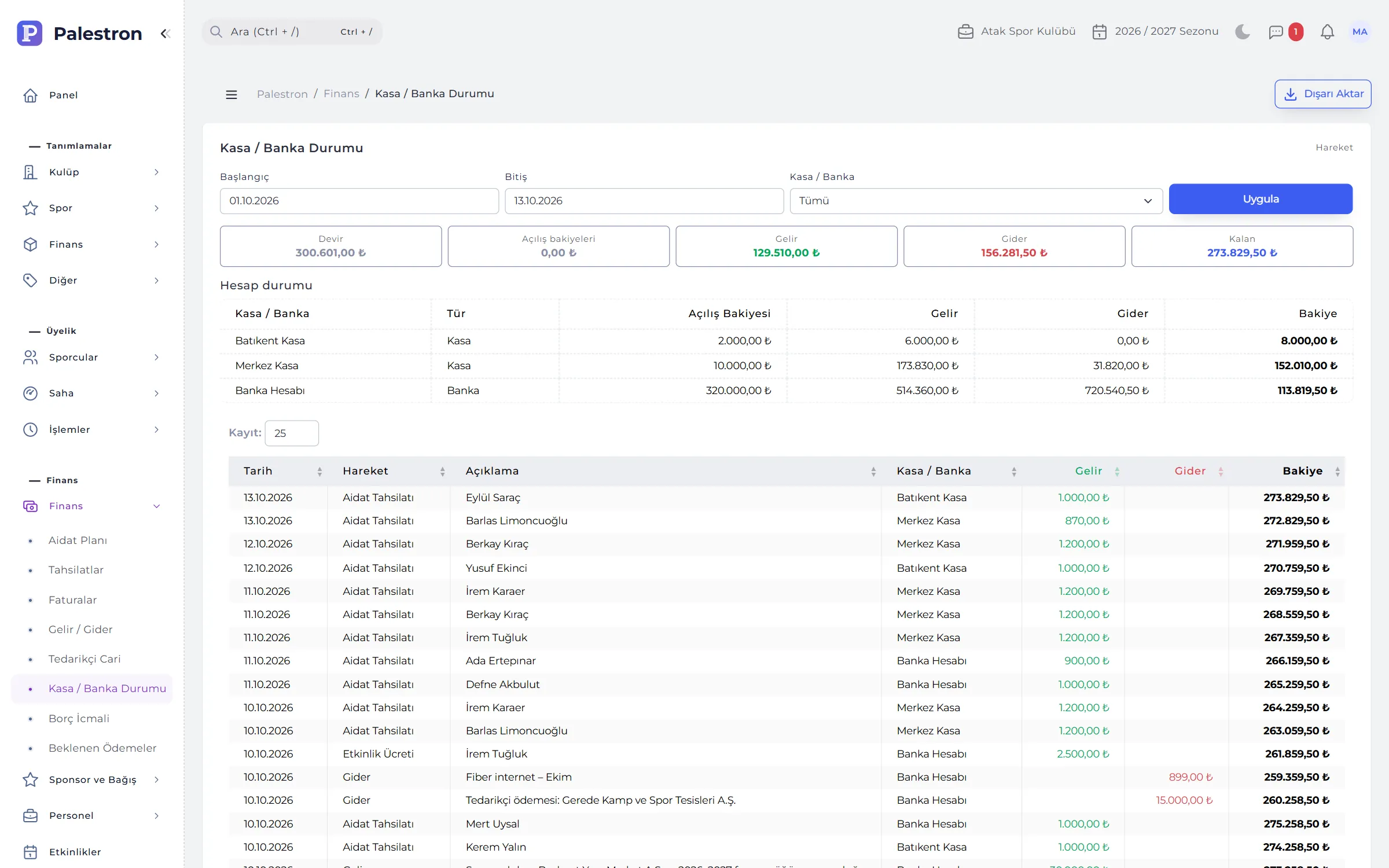
Every collection, income, expense, payroll and supplier payment goes to a cash, bank or POS account. Cash / Bank Status shows movements with a running balance, carry-over and opening balance; the income-expense report reads the same movements.
- Fees never counted twice: fee collections aren’t written to the income-expense list; the till and the report read them from their own source.
- Automatic lines: payroll, advances, equipment purchases and sales, fixed assets, sponsorship, donations and association dues are written from their own screens and can’t be edited in the list.
- Supplier ledger: purchases add debt, payments leave the till, refunds reduce expense; statements with a running balance.
- Account codes: income-expense types can carry your accountant’s chart-of-accounts code.
06SPONSORSHIP AND DONATIONS
Income beyond fees, on record too.
Sponsorship agreements are kept with their consideration (shirt advertising, pitch boards, social media, naming rights…) and the contract file; 60 days before the end a dashboard alert appears. Sponsorship collections and cash donations are written to income automatically.
- Agreement amount: can’t drop below what has been collected; collections can’t exceed the agreement.
- Donation receipt: sequential number within the year, amount in words and signature fields, as a PDF; cash or in-kind donations.
- Voiding: a donation receipt is never deleted; it is voided with a reason and its number isn’t reused.
RULES
Finance rules
To keep instalment balances and the till consistent:
Account required
Collections and income-expense entries can’t be saved without a cash / bank account; no movement is left without one.
No more than the debt
A collection can’t exceed the athlete’s open fee debt; paid instalments take no further collections.
Voided, never deleted
Collections, issued invoices and donation receipts are never deleted; they are voided with a reason and numbers aren’t reused.
Instalments with payments
Can’t be deleted and can only be increased; to reduce, use a refund or transfer.
See it with your own club.
Leave a demo request and try Palestron with your own branches, sports and groups.