

Exam grading and scoringOpen-ended, writing and speaking answers graded on one screen.
The grading list, a grading screen with question filters, rubric and AI-assisted scoring, blind and double marking, the final score with its justification, and result publishing. Auto-scored questions are ready as soon as the exam ends.
01GRADING LIST
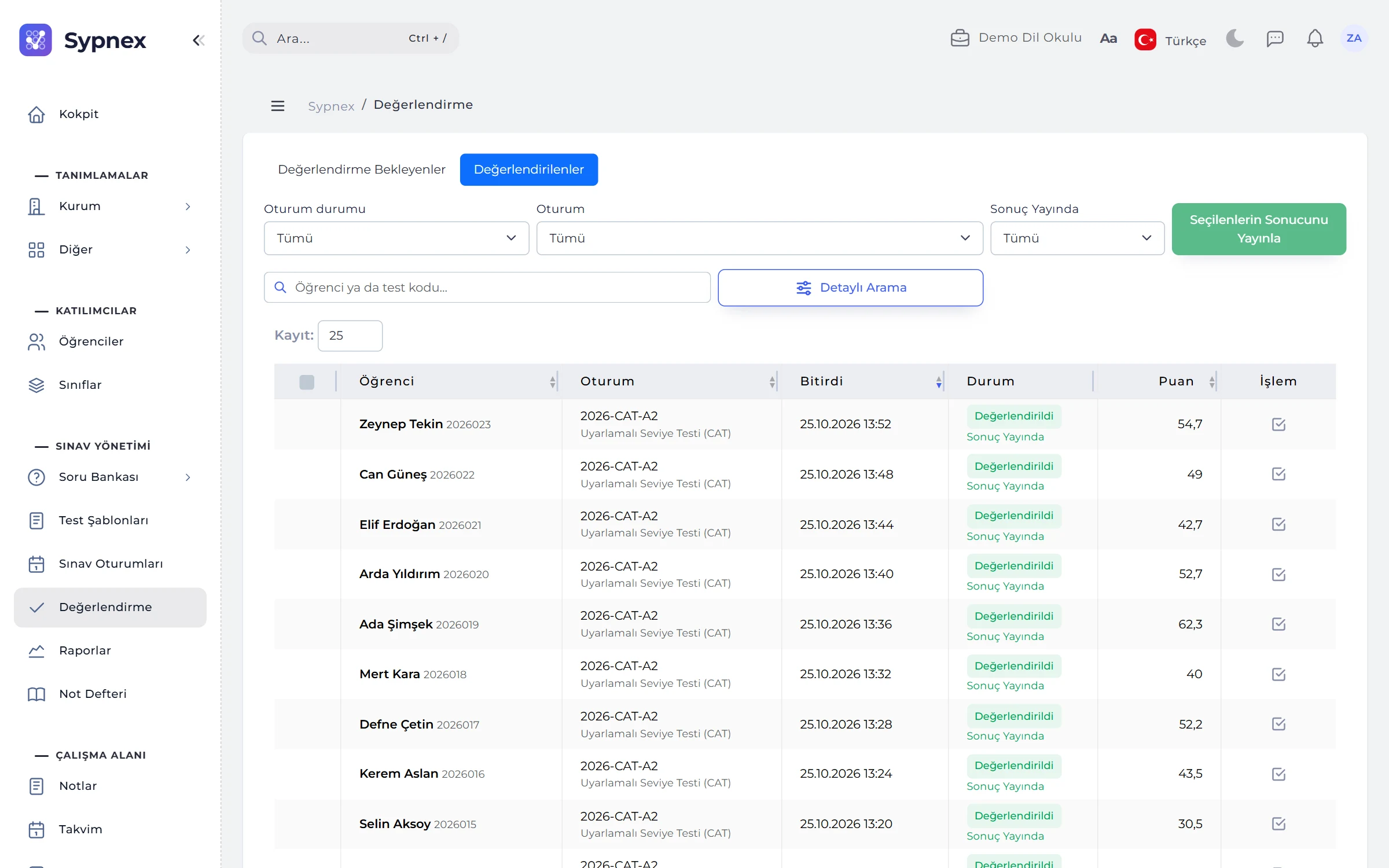
How many answers are waiting in which session, at a glance.
Sessions appear at the top with their pending and unpublished counts, attempts below in the Pending and Graded tabs. The status column shows “N awaiting score” and “N questions saved”.
- Filters: class, test, status, manually changed score, published or not, submission date range.
- Absentees: students who did not sit the exam are not counted as pending; if needed, they are completed with 0 points.
- Bulk publishing: results of the selected attempts are published with a single button.
02GRADING SCREEN
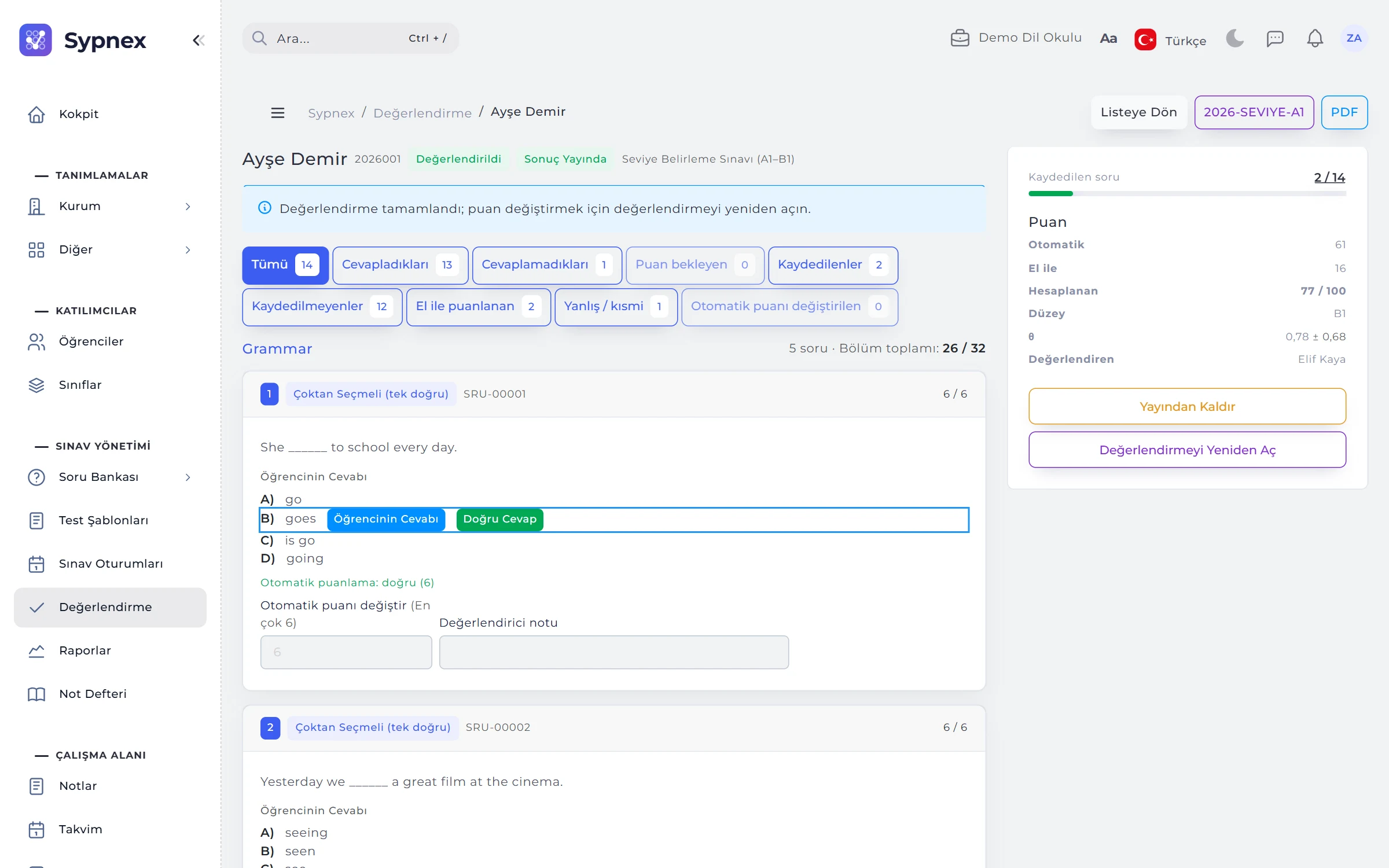
The student’s answer, the correct answer and the score side by side.
Clicking an attempt opens all answers section by section. The right panel shows the total of automatic and manual scores, the maximum on the chosen scale, the level, ability (θ) and progress on saved questions.
- Question filter: answered, unanswered, awaiting score, hand-scored, wrong / partial, auto score changed.
- Quick scoring: Full points and Zero buttons, a note shown to the student; saved questions get a green edge.
- Override auto score: the card shows the old and new value; Revert to auto score undoes it.
- Audio answers: spoken answers play on screen.

03RUBRICS AND AI
Scores criterion by criterion; a reasoned AI suggestion if you want one.
If a rubric is linked to the question, the grader picks a level for each criterion and the score is calculated. AI Suggestion gives criterion-based scores and reasons for writing and speaking answers; Apply only fills in the form, and the grader saves it.
- Spoken answers: transcribed first, then assessed.
- You decide: the AI suggestion is not a decision; it is switched off in double marking.
04BLIND AND DOUBLE MARKING
Names hidden and a second pair of eyes, for fair scores.
In blind marking the grader does not see the student’s name (“Student #12”); the name is revealed when grading is complete. In double marking every hand-scored question is scored independently by two graders.
- Difference threshold: if the two scores differ by more than the threshold, a third grader is needed; the average of the two closest scores counts.
- Hidden scores: other graders’ scores stay hidden until you give yours.
- Status badges: waiting, agreed, third needed; Complete is unavailable while a question is unresolved.
05COMPLETING AND PUBLISHING
A published result goes to the student, the parent and the LMS.
Complete sets unscored questions to 0 and calculates the total. With Publish result the student sees the result and the PDF result document, students who pass receive a certificate, a “Result published” notice is sent and the grade goes to the LMS.
- Final score: a reason is required if it differs from the calculated score; only staff see the reason.
- Undo: Unpublish hides the result, Reopen reopens grading.
- Norm sessions: results are announced together from the session with Finalise and Publish.
Run your next exam with Sypnex.
Leave a demo request and try Sypnex with your own questions, classes and scoring rules.