

Heavy equipment maintenance, breakdown and repair trackingThe counter says when to service; the timeline tells the breakdown’s story.
Counter-based preventive maintenance, per-part change intervals, warranty protection, workshop planning, a single-file breakdown timeline, root cause and external service approval. The field records, the office completes, an authorised person closes.
01PREVENTIVE MAINTENANCE
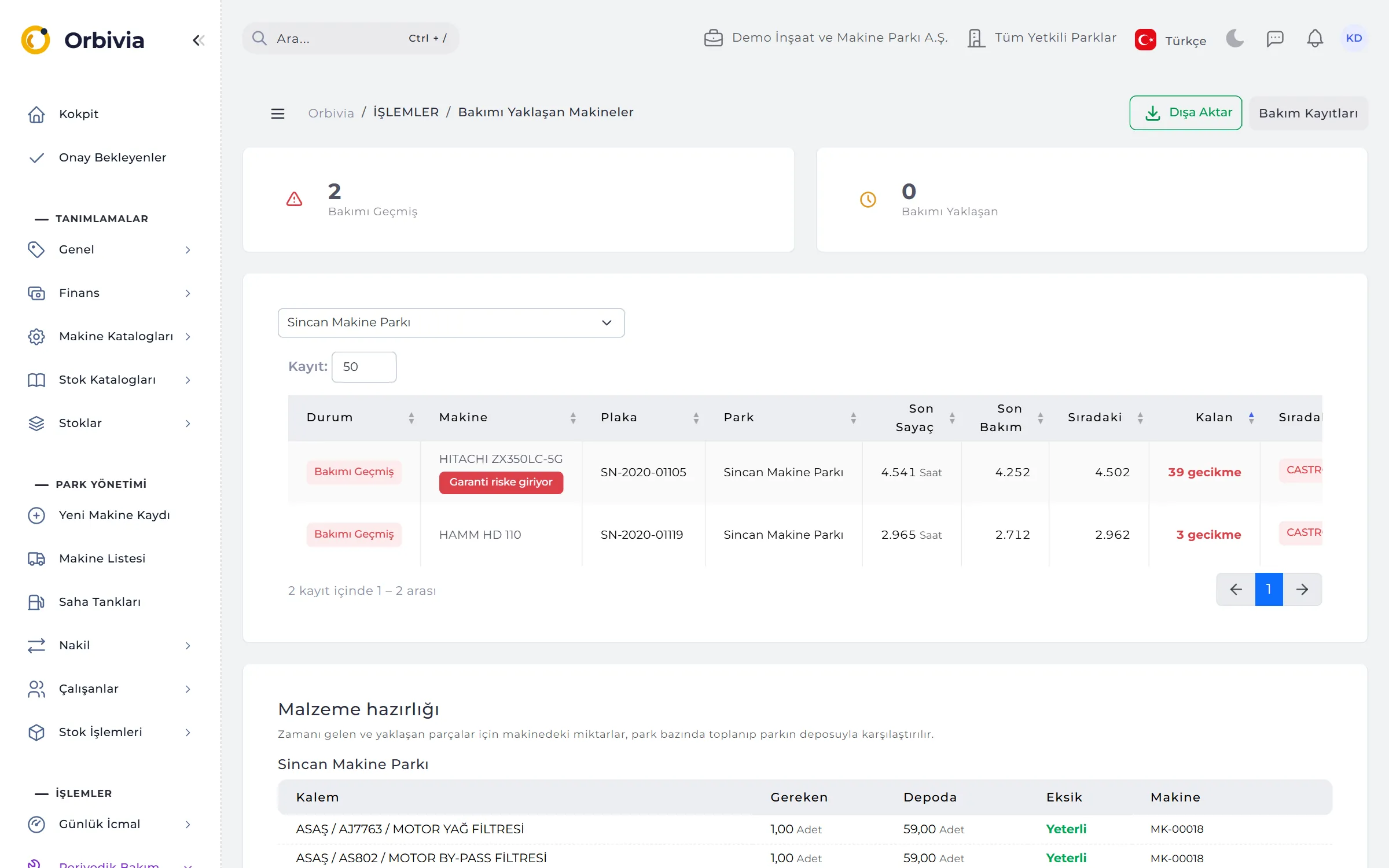
The schedule watches the counter, not the calendar.
The next service is the counter of the last schedule-resetting service plus the interval (e.g. 250 hours or 15,000 km). When the remainder falls to a fifth of the interval the machine is Maintenance due; below zero it is Overdue.
- Per-part intervals: engine oil every 250 hours, hydraulic oil every 2,000 and so on; when a part is due the machine is listed even if the general interval isn’t.
- Timing badge: within ±10% of the target it’s On time, otherwise Late or Early: “80 hours late (target 310)”.
- Material preparation: parts to be changed are totalled per site; required, in stock and missing quantities, with a one-click purchase request for the gaps.
- Greasing: lubrication follows its own schedule; neither resets the other.
02MAINTENANCE RECORD
Checklist, materials and cost on one form.
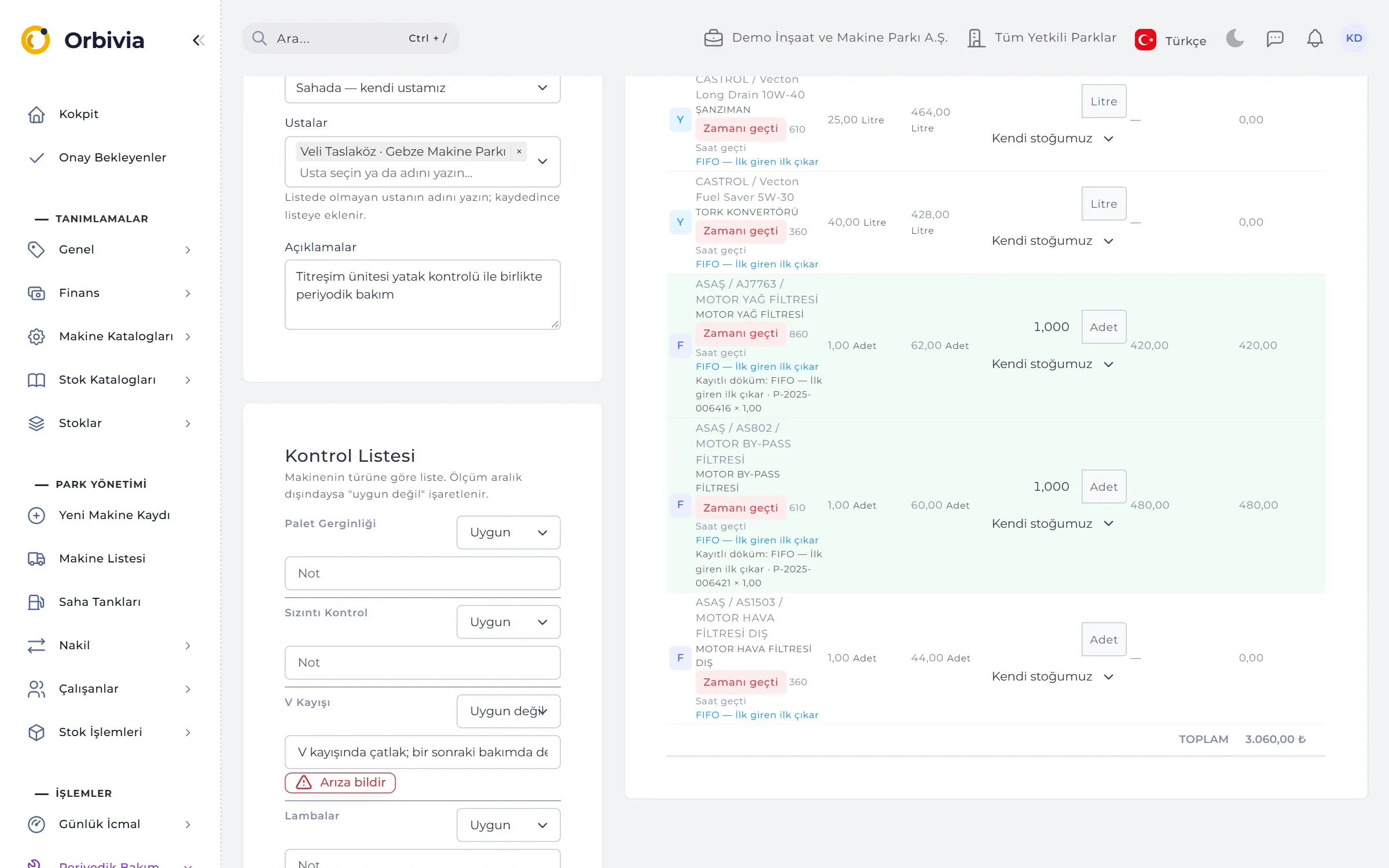
A service is a time span: its start and end are recorded with counter readings. Every service records where it was done (on site by our own technician, on site by the dealer, at the dealer); warranty warnings and dealer packages depend on it.
- Checklist: comes from the machine type; an out-of-range measurement automatically becomes “Not OK” and opens a breakdown in one click.
- “Fill what’s due”: parts due for change are filled in with the quantity in the machine; if stock is short the record isn’t saved.
- Cost: unit cost comes from the valuation method, not typed in; deleting a service reverses its stock issues.
- Who pays: Us, Warranty (free), Warranty (to recover), Insurance or Lessee — line by line.
- Paper service card: printable for signing on site, with “Serviced by” and “Approved by” fields.

03WARRANTY
See the service that puts a warranty at risk while you’re recording it.
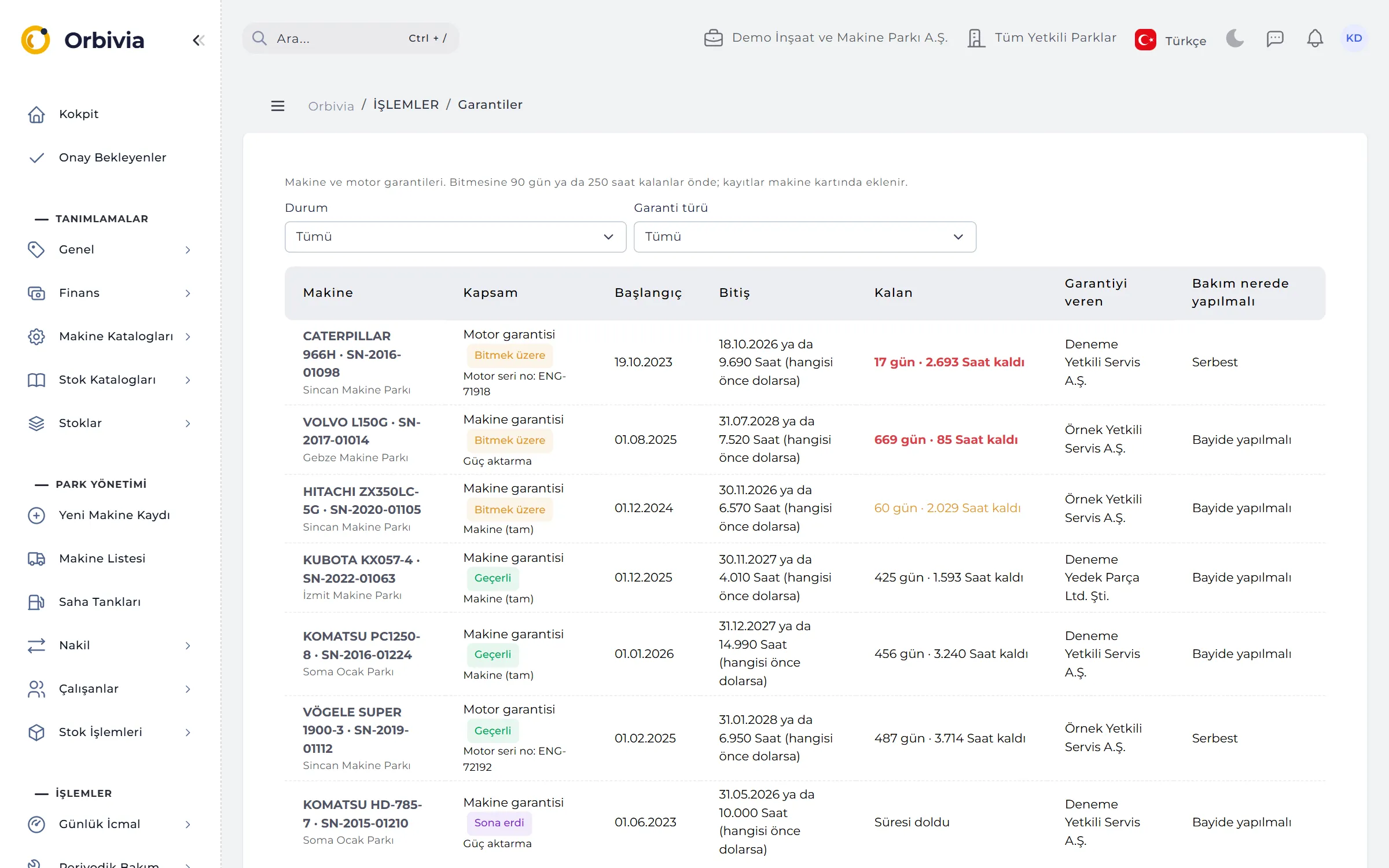
A machine warranty (full, powertrain, engine or custom) and a separate engine warranty tied to the engine serial number are kept. It ends at the time limit or the counter limit, whichever comes first: “30.09.2027 or 4,150 hours”.
- Early warning: 90 days or 250 hours (5,000 km on km-metered machines) before expiry; urgent and red at 30 days.
- Risky service: choosing “our own technician” on a machine under warranty turns the box red; an overdue machine shows “Warranty at risk”.
- Engine changed: if the engine serial number changes, the warranty status is flagged automatically.
- Dealer package: free initial services are counted (“1 / 2”); within the package price no service approval is needed.
- Claims and damage: warranty recovery claims and insurance damage files are tracked through to collection.
04WORKSHOP PLAN
Your technicians’ week at a glance.
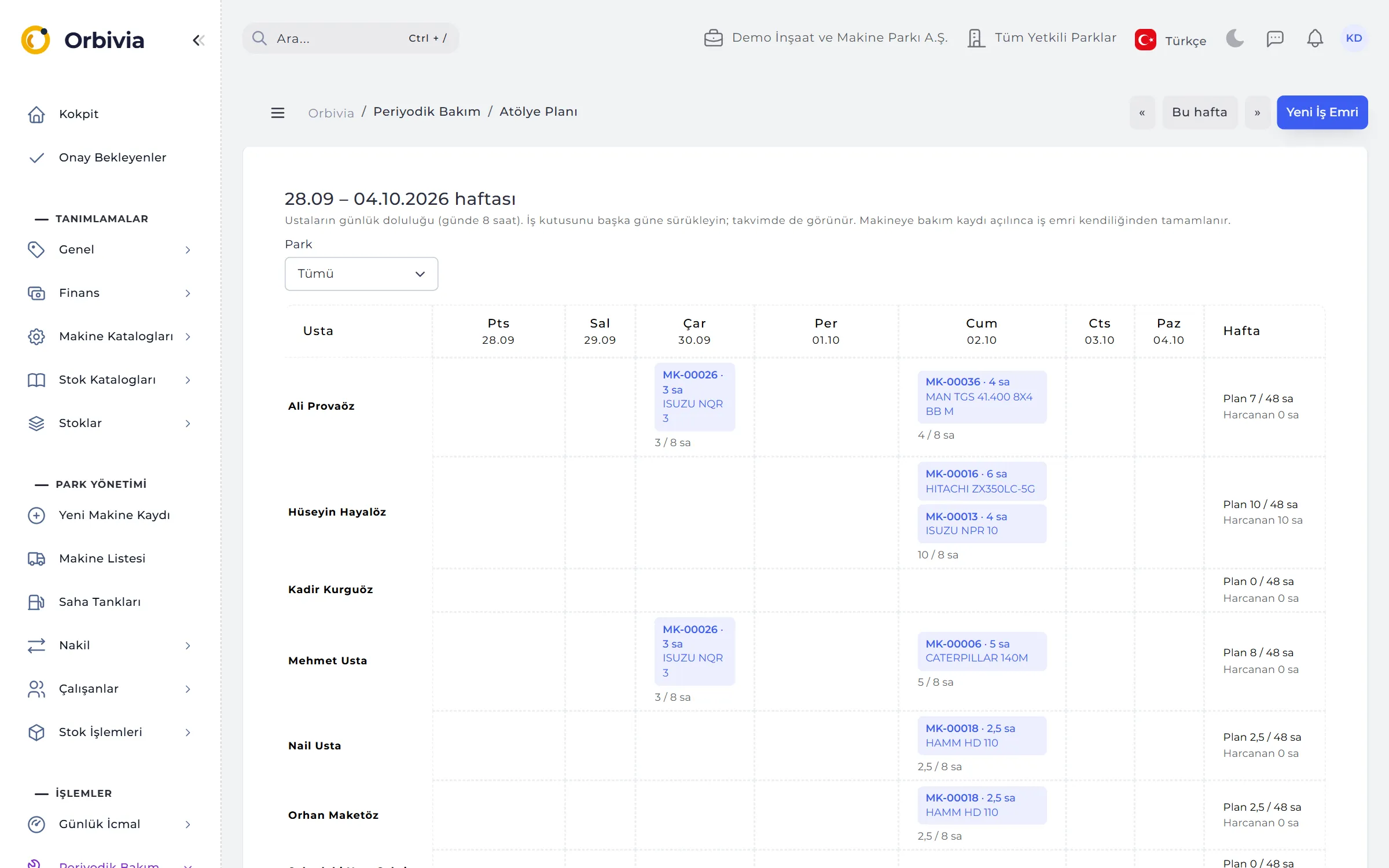
The weekly plan shows technicians as rows and days as columns. Against an 8-hour daily capacity, load turns yellow at 75% and red above 8 hours; planned hours sit next to hours actually spent on maintenance and repairs.
- Drag and drop: move job tiles to another day; a calendar view is available too.
- Suggested day: tomorrow if overdue; if due soon, the day the remainder runs out based on the last 30 days of counter growth.
- Preparation: the job window shows materials missing from the site store and a “Start maintenance” button.
- Closes itself: when a service is opened on the machine, a work order within ±14 days is completed and linked to it.
05BREAKDOWN TIMELINE
Downtime is calculated, not guessed.
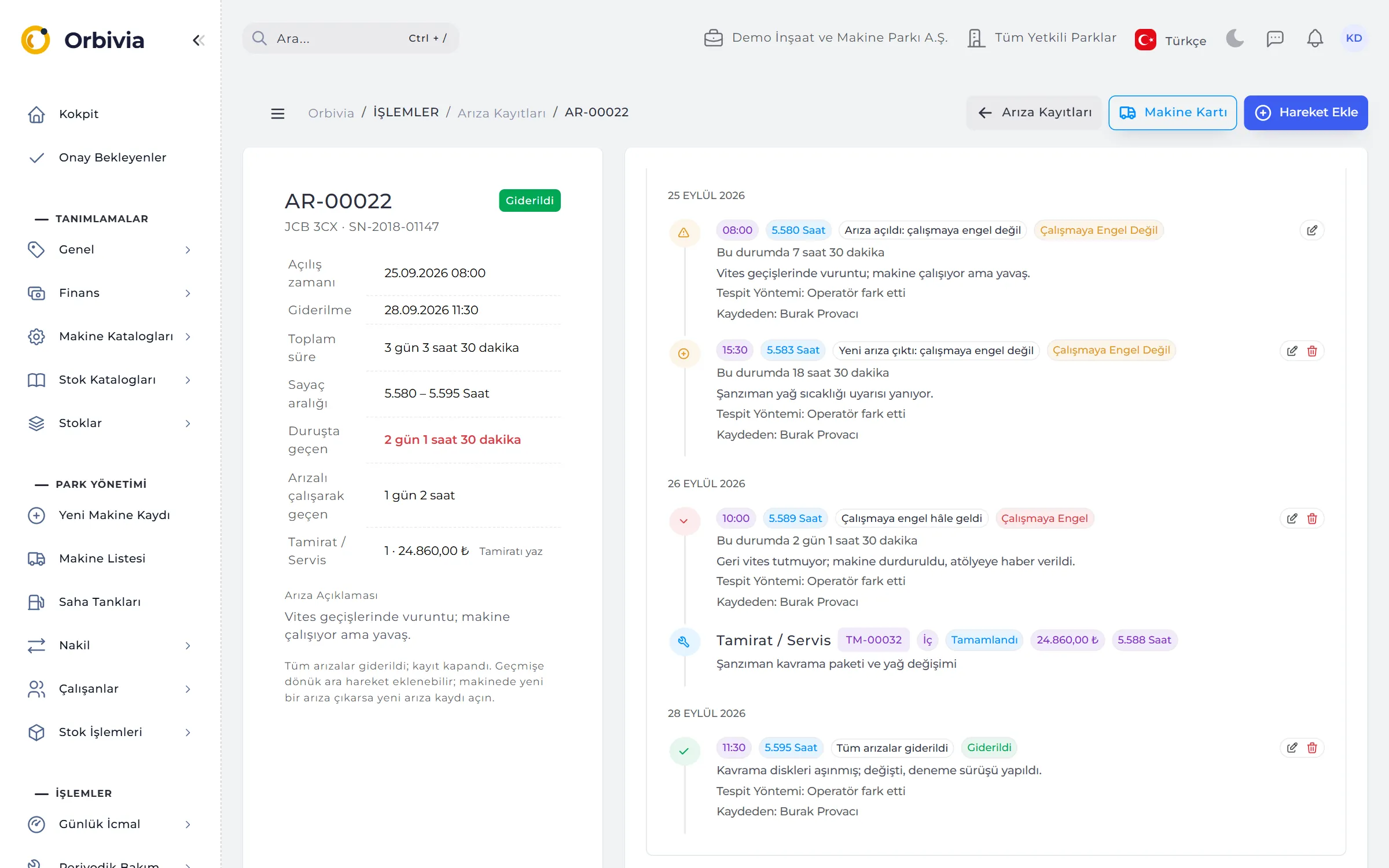
Each machine has a single open breakdown file; later problems are added to it as events, each carrying the counter at that moment. From the Prevents work, Doesn’t prevent work and Fixed states, time spent down and time spent running with a fault are worked out automatically.
- Three ways in: the field app, a fault note in the end-of-day entry, or the operator’s pre-shift daily check.
- Detection method: operator, preventive maintenance, inspection or a telematics alarm.
- Root cause: mandatory on fixing; seven classes from operating error to material fatigue.
- Reminder: breakdowns “fixed but no repair recorded” are caught on the timeline, in the bell and on the Cockpit.
06REPAIRS AND EXTERNAL SERVICE
Every lira paid to an outside service passes approval.
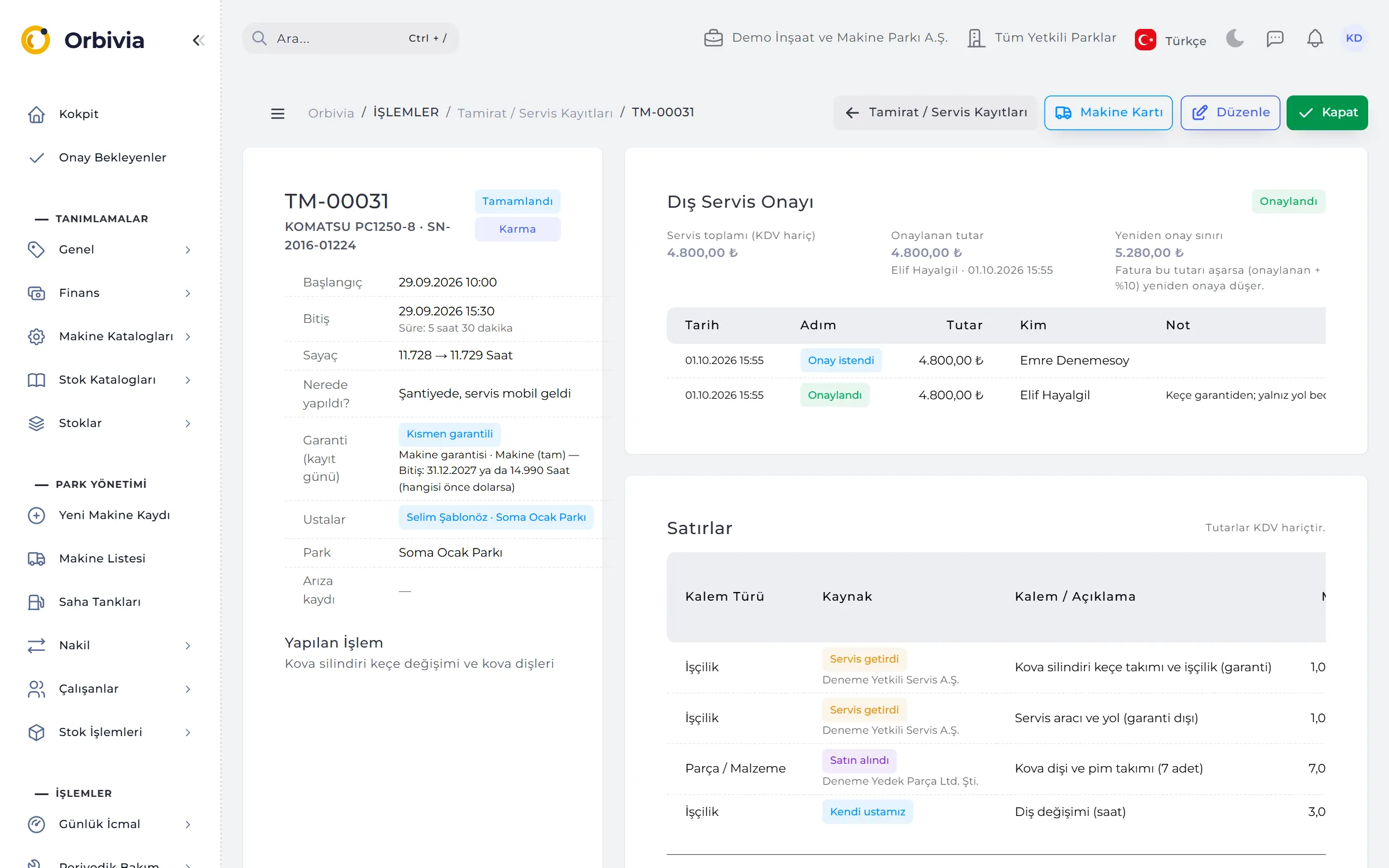
A repair separates in-house and external work line by line, and the record is classed In-house, External service or Mixed. A record with a “brought by service” line goes to approval automatically on saving; work doesn’t wait for approval, but an unapproved record can’t be closed.
- Approval limit: up to the amount in the person’s template; above it the request goes to the next approver.
- The 10% rule: if 10,000 was approved, no re-approval is needed up to 11,000; beyond that the record goes back for approval.
- Approval history: every step is kept with date, amount, person and note; a reason is mandatory for rejection.
- Repeat (didn’t hold): a record linked to an earlier repair shows a red badge — a measure of service quality.
- Warranty split: an invoice’s lines can be split between warranty and the company: Under warranty, Partly, Not under warranty.
RULES
Closing rules
A closed record’s figures are final, so closing depends on a checklist.
Who closes
Only the Company Administrator and the Site Manager close and reopen maintenance and repairs.
When it can close
An end time must be recorded, a field draft must be completed in the office, and external service must be approved.
The right site
A service is recorded against the site the machine was on that date; materials come out of that site’s stock.
Fixing a breakdown
A breakdown can’t be fixed while a linked repair or service is open; two breakdowns on one machine can’t overlap in time.
See it with your own fleet.
Leave a demo request and try Orbivia with your own machines, sites and projects.