

Site fuel, tank and inventory trackingThe cost of every litre and every part, with accounting rigour.
Daily logs, site tanks, reconciliation by dip count, five stock valuation methods, site transfers, stock counts and purchasing. The same litre is never counted twice; a back-dated correction re-costs every later movement.
01DAILY LOG
A whole site’s end of day on one screen.
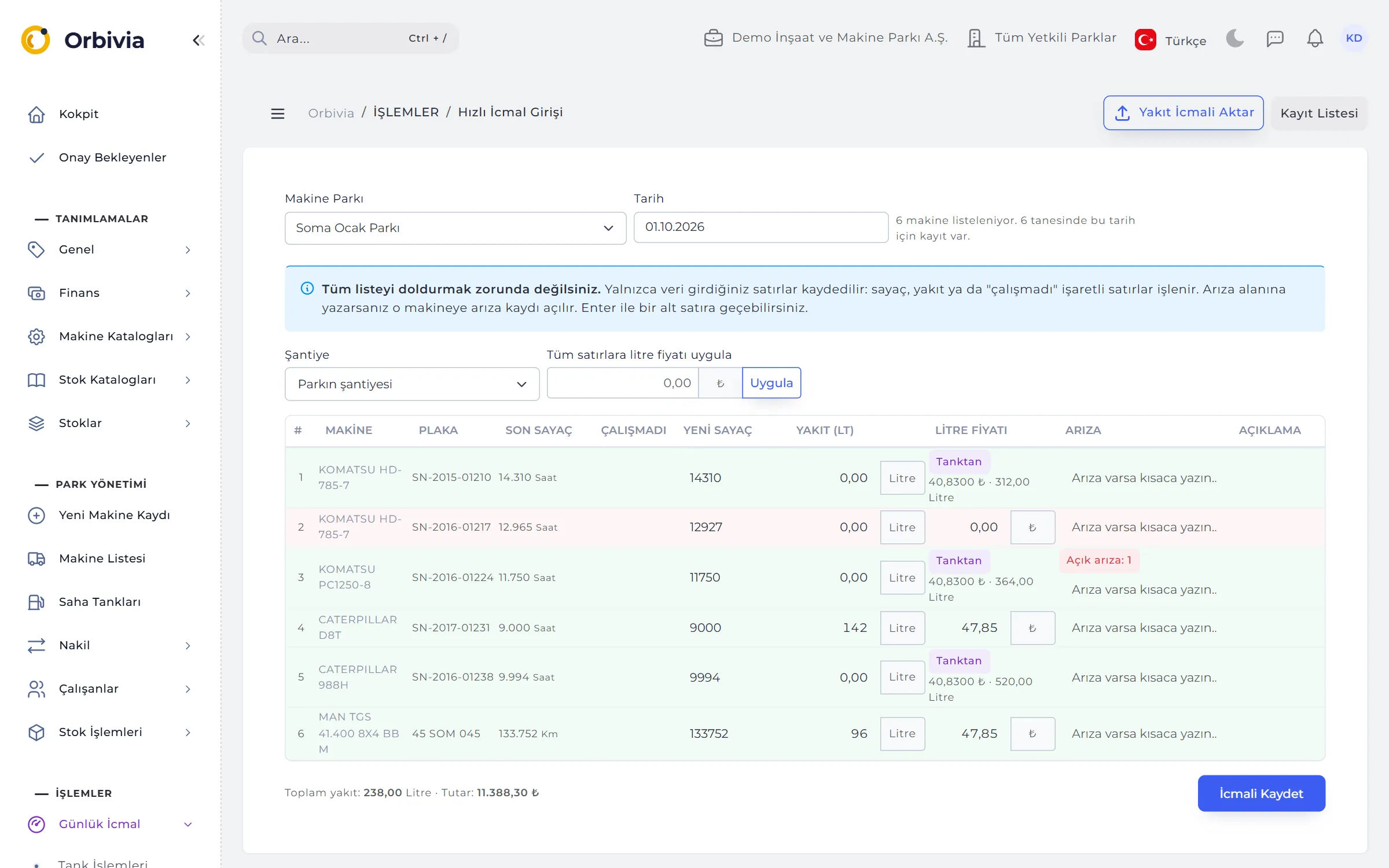
Quick Daily Log lists every active machine on the site row by row: last counter, did not work, new counter, fuel, price per litre, fault and notes. Enter jumps to the row below; the litre price can be applied to all rows in one click.
- All or nothing: a row turns red if its counter goes backwards; if anything is wrong nothing is saved, and nothing typed is lost.
- Did not work: if the counter equals the previous reading and no fuel was logged, the day is marked “Did not work” automatically.
- Fault column: a short note opens a new breakdown or adds an event to the open one.
- Manual entry wins: telematics and tracking data are written to the log automatically, but never overwrite a counter entered by hand that day.
02TWO-LEDGER FUEL
The same litre is never counted twice.
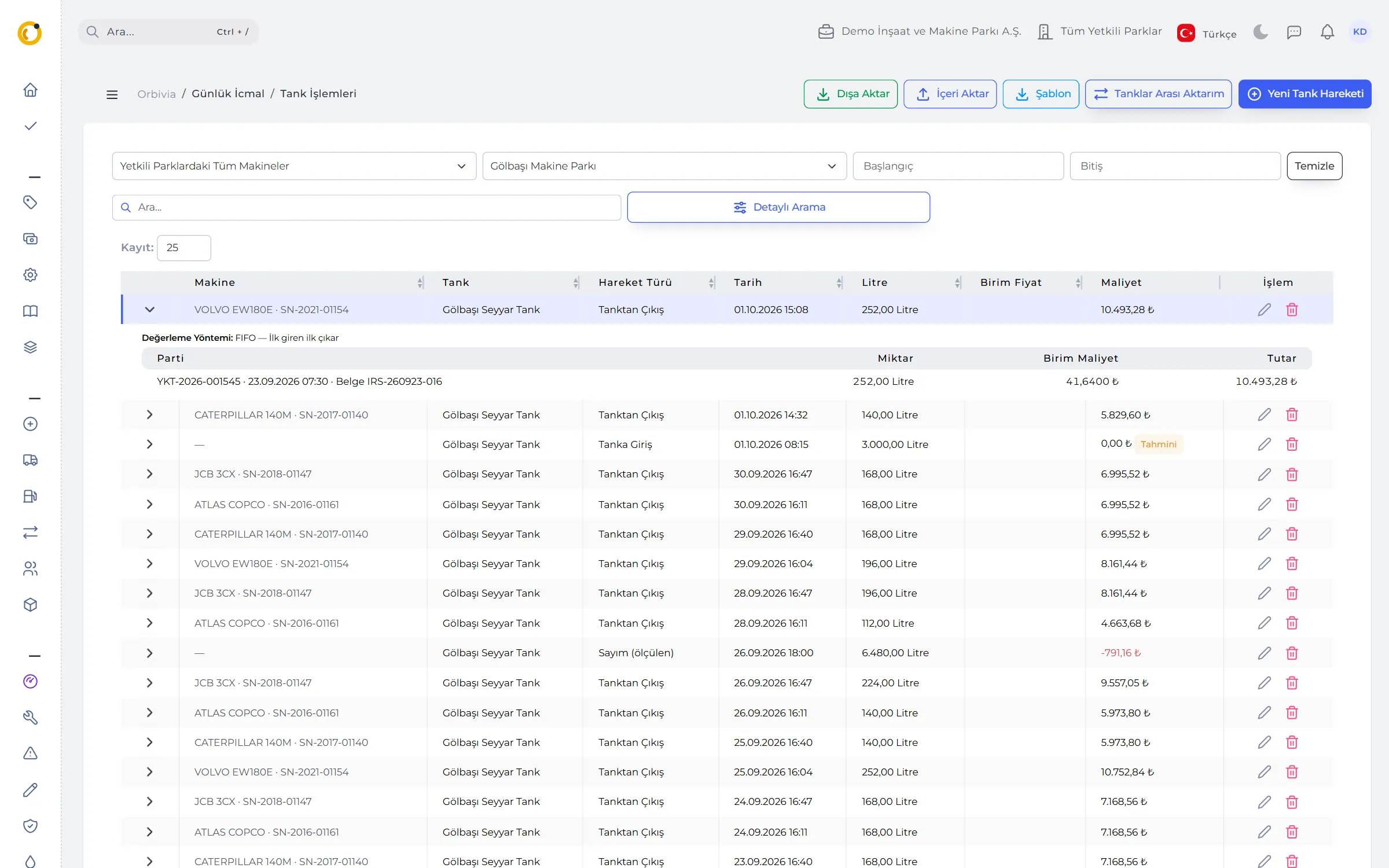
Fuel from a site tank goes to Tank Transactions; fuel bought at a station or with a fleet card goes to the daily log. Tank fuel shows in the log as read-only with a “From tank” badge; if a machine took fuel from both on the same day, only the tank issue is costed.
- Lots: every tank receipt opens a lot coded YKT-year-number; every issue shows which lot it came from and at what cost.
- Checks: fuel that isn’t in the tank can’t be dispensed; a single fill can’t exceed the machine’s tank capacity; no future dates.
- Estimated cost: fuel without a price is flagged “Estimated”; when the price arrives, later issues are re-costed.
- Automation: tank automation files and tank-to-tank transfers; uploading the same file twice never doubles the movements.
- Tanks: diesel, petrol and AdBlue; expected level and fill percentage.

03FUEL RECONCILIATION
Losses, leaks and forgotten entries become visible.
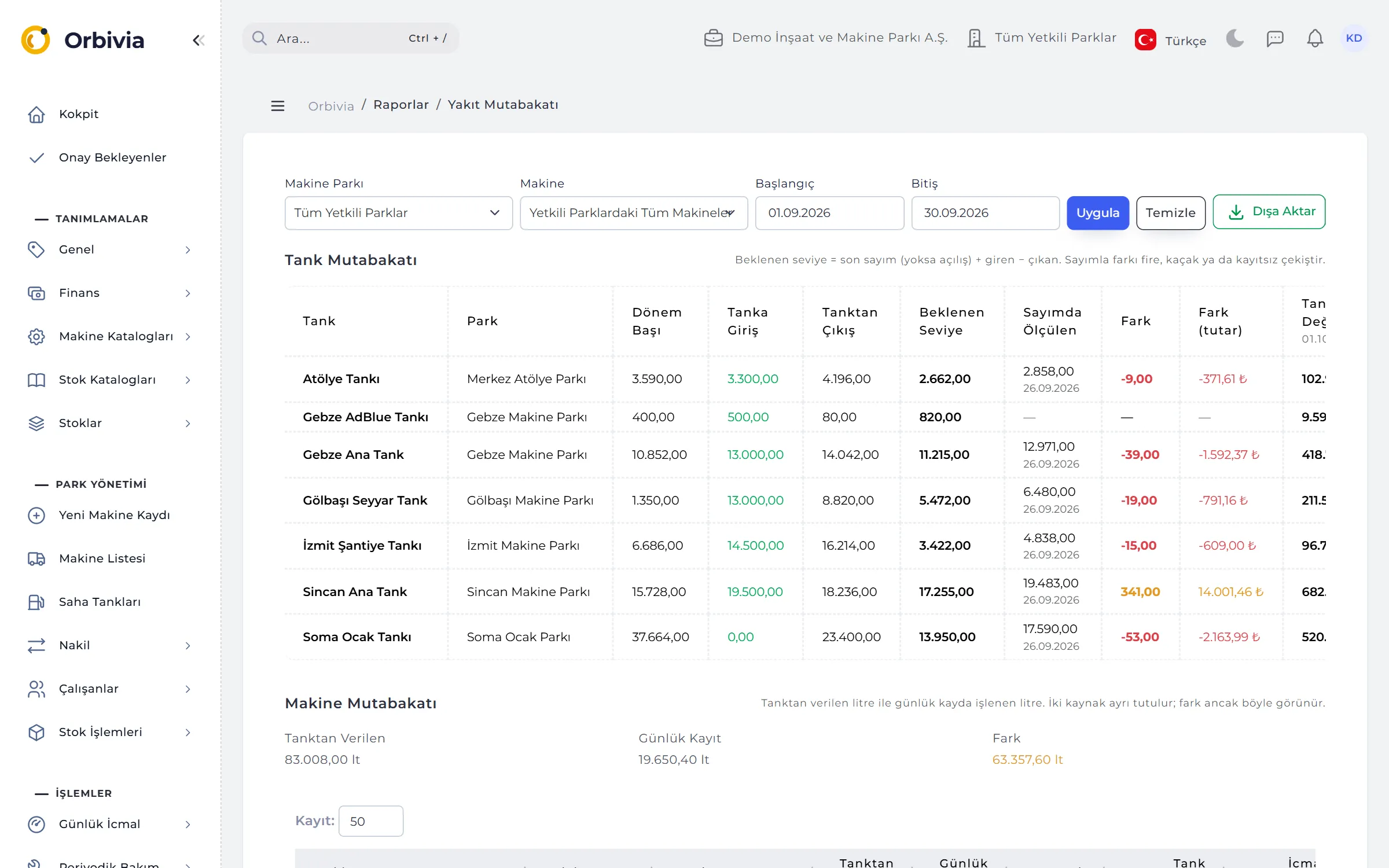
A tank dip is compared with the expected level: a shortfall is booked as an expense, a surplus becomes a new lot at the tank’s average cost. The Fuel Reconciliation report sets measured against calculated on the tank side, and dispensed against logged on the machine side.
- Tank reconciliation: last dip + in − out = expected; the difference with the measurement is colour-coded.
- Machine reconciliation: dispensed from tank − written in the daily log; forgotten or duplicated entries.
- Fuel cards: statements from distributors such as Opet, Shell, Petrol Ofisi, BP, TotalEnergies and Aytemiz are read without converting to Excel; VAT-inclusive amounts become a net price per litre.
04STOCK VALUATION
You choose the costing method; Orbivia does the maths.
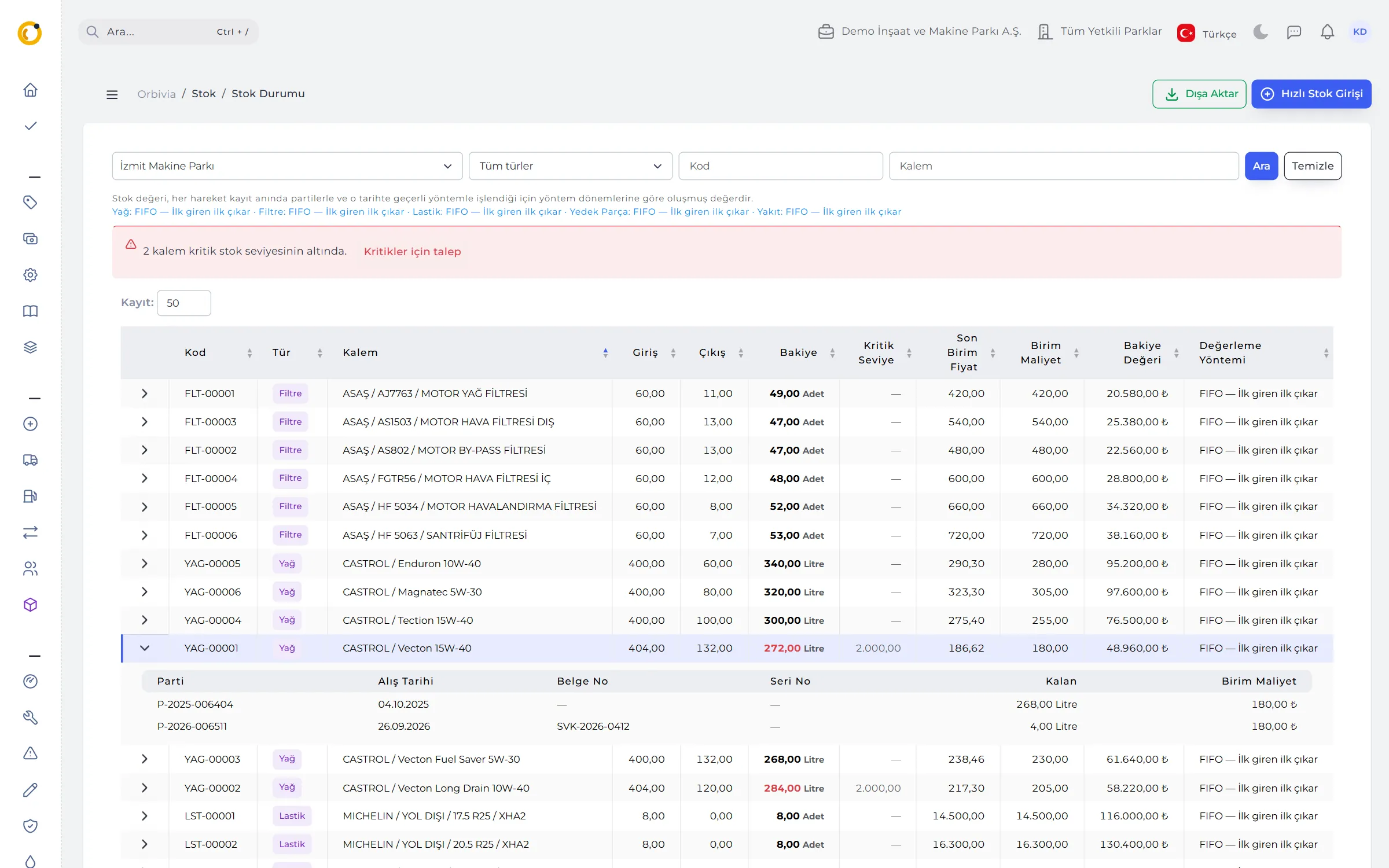
Five methods: moving weighted average, FIFO, LIFO (US GAAP only), periodic (monthly) weighted average and actual cost (lot / serial number). The method is set separately for oil, filters, tyres, spare parts and fuel, with dated valuation periods.
- At the moment of entry: no unit price is typed on issues; the cost is calculated and stored with the record.
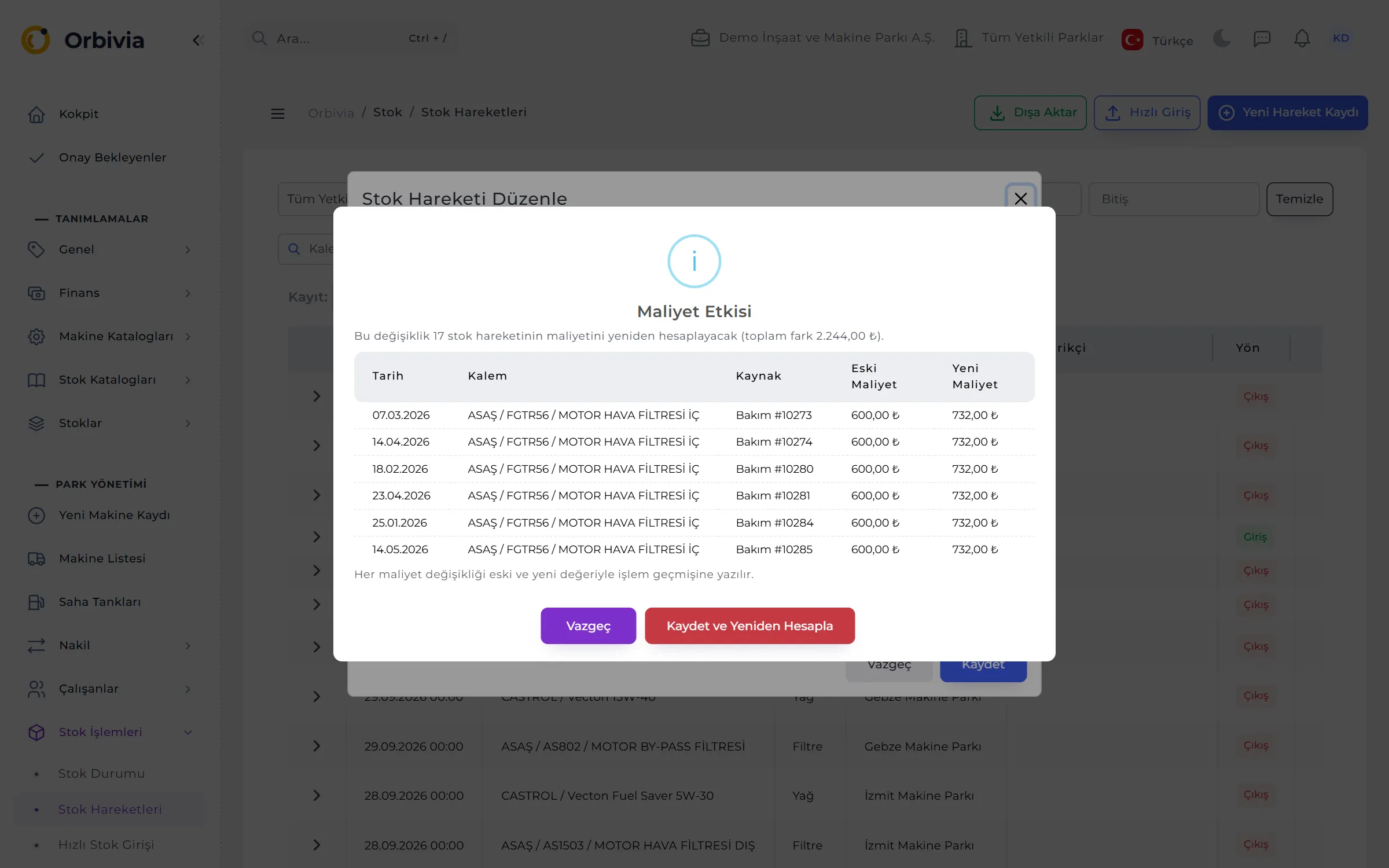
- Back-dated corrections: when a past movement changes, later movements are re-costed in order; a Cost Impact window shows old and new cost before you save.
- Period change: stock on hand moves to the new method as carry-over lots; a closed period is locked.
- Example: with 1,000 l × 40 and 2,000 l × 43 in the tank, issuing 1,500 l costs 63,000 on average, 61,500 under FIFO and 64,500 under LIFO.
05STOCK, TRANSFERS AND COUNTS
Cards are company-wide; balances are per site.
Oil, filters, tyres and spare parts: from make and variant catalogues to stock cards, from cards to per-site movements. Stock Status shows each item’s balance, unit cost, value and remaining lots; anything below the critical level is red.
- Per-site critical level: shown next to quantity on hand and the last 90 days of issues, so the level follows real consumption.
- Site transfer: add items by barcode; an “In transit” state; “Receive” opens the lots on the other site at the same cost.
- Stock count: the list arrives pre-filled with system quantities and only differences are typed; “Post differences” turns them into stock movements in one click.
- Purchase prices: last purchase, % change and the cheapest supplier of the last 12 months.
- The right part: OEM cross-references for filters; part numbers match regardless of spelling (1R-0716 = 1r0716).
06PURCHASING
From request to invoice, with other sites’ stock in view.
An optional purchasing flow: request, approval if above the threshold, order, goods receipt and invoice matching. Request lines show stock on other sites too, so nothing is bought twice when a transfer would do.
- One-click requests: “Request for critical items” and “Request for missing items”; missing = critical level − stock − open orders.
- Goods receipt: partial deliveries; extra costs such as freight are spread over the lines into unit cost; stock receipt is posted automatically.
- Invoice matching: “matches” or “Difference: …”; “awaited for … days” and “Invoice awaited” warnings.
- Issue approval: a stock issue above the threshold goes to approval — including barcode issues from the phone.
RULES
Costing rules
To keep stock and fuel costs auditable:
Closed periods
No movement can be added to, or changed in, a closed valuation period.
No uncovered issues
If a change would leave a later issue without stock, nothing is saved.
Counters never go back
Daily logs, tanks, maintenance, breakdowns and repairs are all checked against the same counter history.
A trail remains
Every cost change is written to the audit log; file imports report faulty rows by number and reason.
See it with your own fleet.
Leave a demo request and try Orbivia with your own machines, sites and projects.